Free Template · from the makers of NominalQC, QC software for small manufacturers
Free ISO 9001:2026 risk and opportunity register for Excel
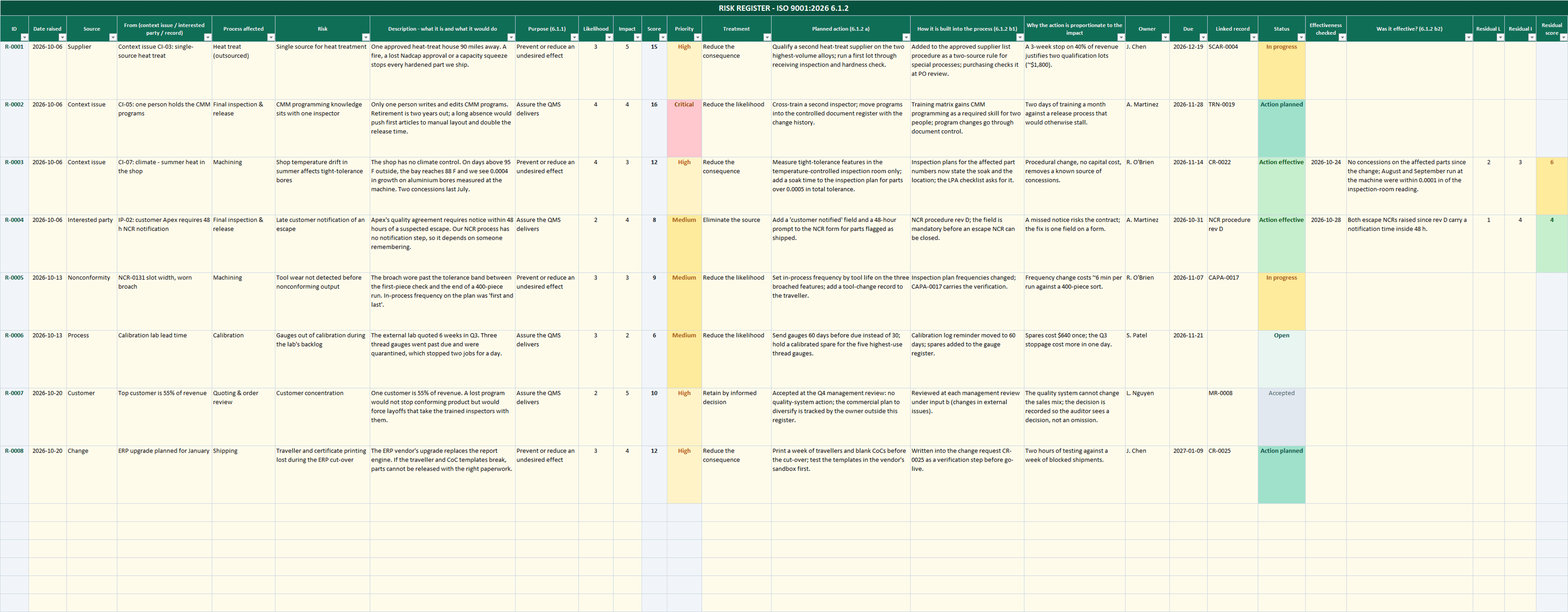
The 2026 edition split clause 6.1 in two: risks in 6.1.2, opportunities in 6.1.3, and management review now asks about each separately. This workbook keeps them as two registers that share one set of scales, one priority rule and one review pack, so the figures 9.3.2 g) and h) ask for come off a single sheet. Every row carries the chain the standard wants: where it came from, the analysis, the action, how the action is built into the process, who owns it, and whether it worked. And it says plainly, as Annex A does, that the matrix and the score are a convenience, not a requirement.
Related: ISO 9001:2026 gap analysis · PFMEA worksheet · Internal audit checklist · Process turtle diagram
Free Excel template — no email, no signup.
This log, without the spreadsheet
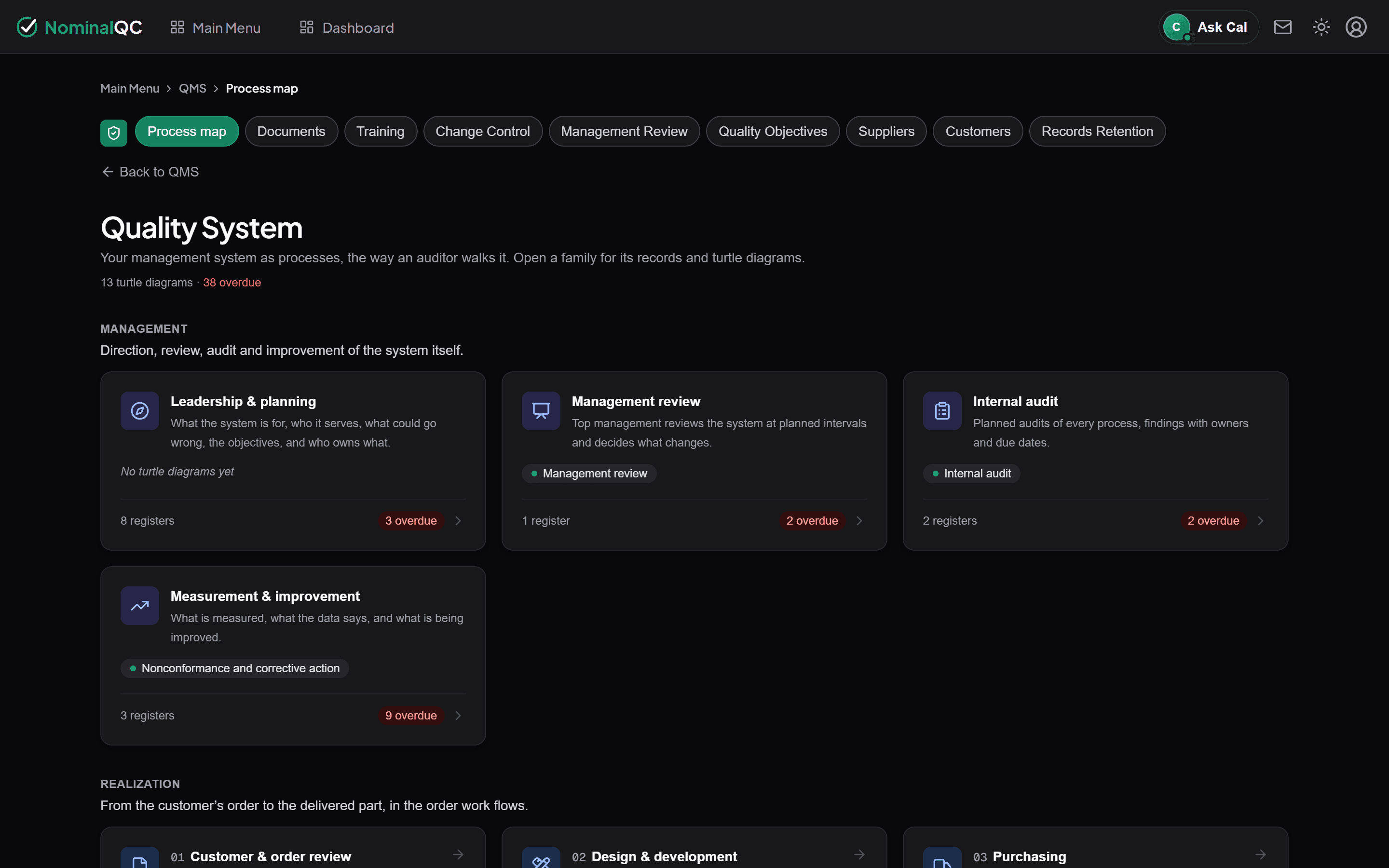
The same register is a screen in NominalQC, under Context & planning on the Quality System page: each risk or opportunity carries likelihood, impact, a suggested priority, an owner and a due date that feed the dashboard and the Monday digest.
Try the live demoOpens on the real app with seeded data · no signup, no email · read-only · free for one user when you’re ready.
Prefer it in your inbox, with two short notes on using it?
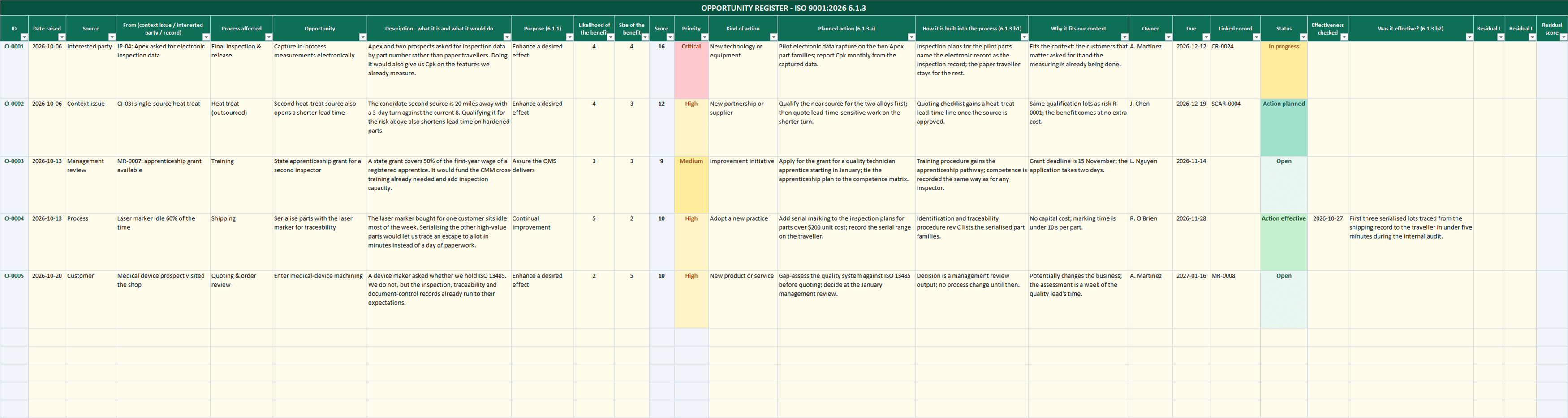
What’s in the download
- RISK REGISTER (6.1.2) and OPPORTUNITY REGISTER (6.1.3): 150 rows each, with the ID, score, priority and overdue flag filled in for you
- The whole 6.1 chain on every row: source and what it came from (a context issue, an interested party, a nonconformity, an audit, a change), the process affected, the purpose per 6.1.1, likelihood and impact, treatment, the planned action, how it is built into the process, why it is proportionate, owner, due date, linked record, status, the effectiveness check and the residual rating
- CONFIG sheet: 1 to 5 likelihood and impact scales with worded definitions, priority bands as live thresholds (change the 16 to 15 and every Critical recolours), treatment lists taken from the 6.1.2 and 6.1.3 notes, and your own owners, processes and sources feeding the dropdowns
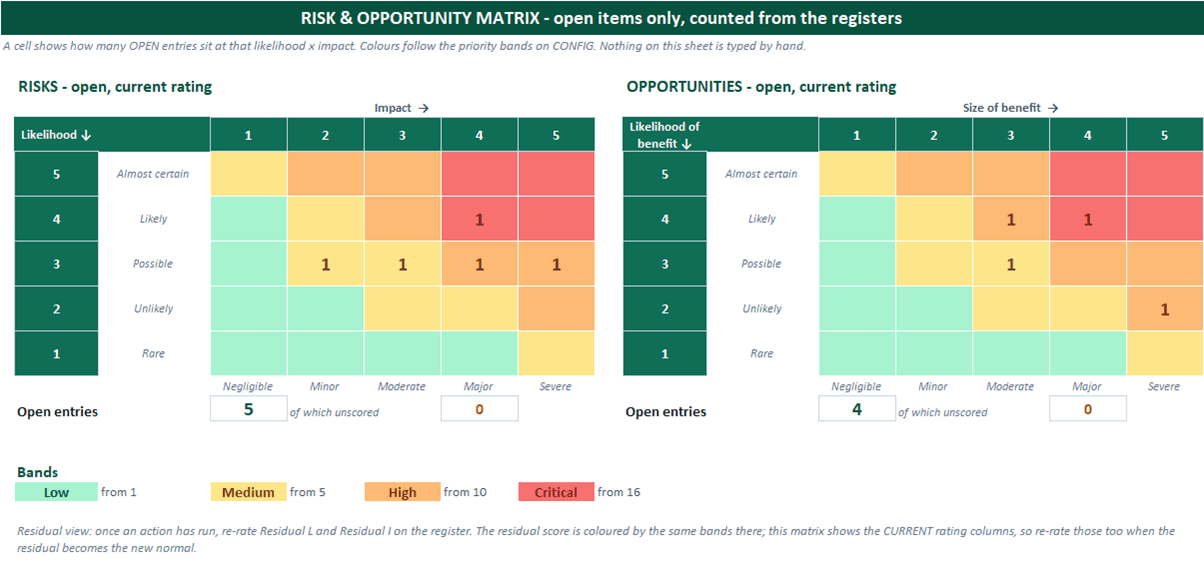
- MATRIX: two 5 × 5 heat maps that count the open entries at each likelihood × impact, coloured from your bands — nothing on the sheet is typed by hand
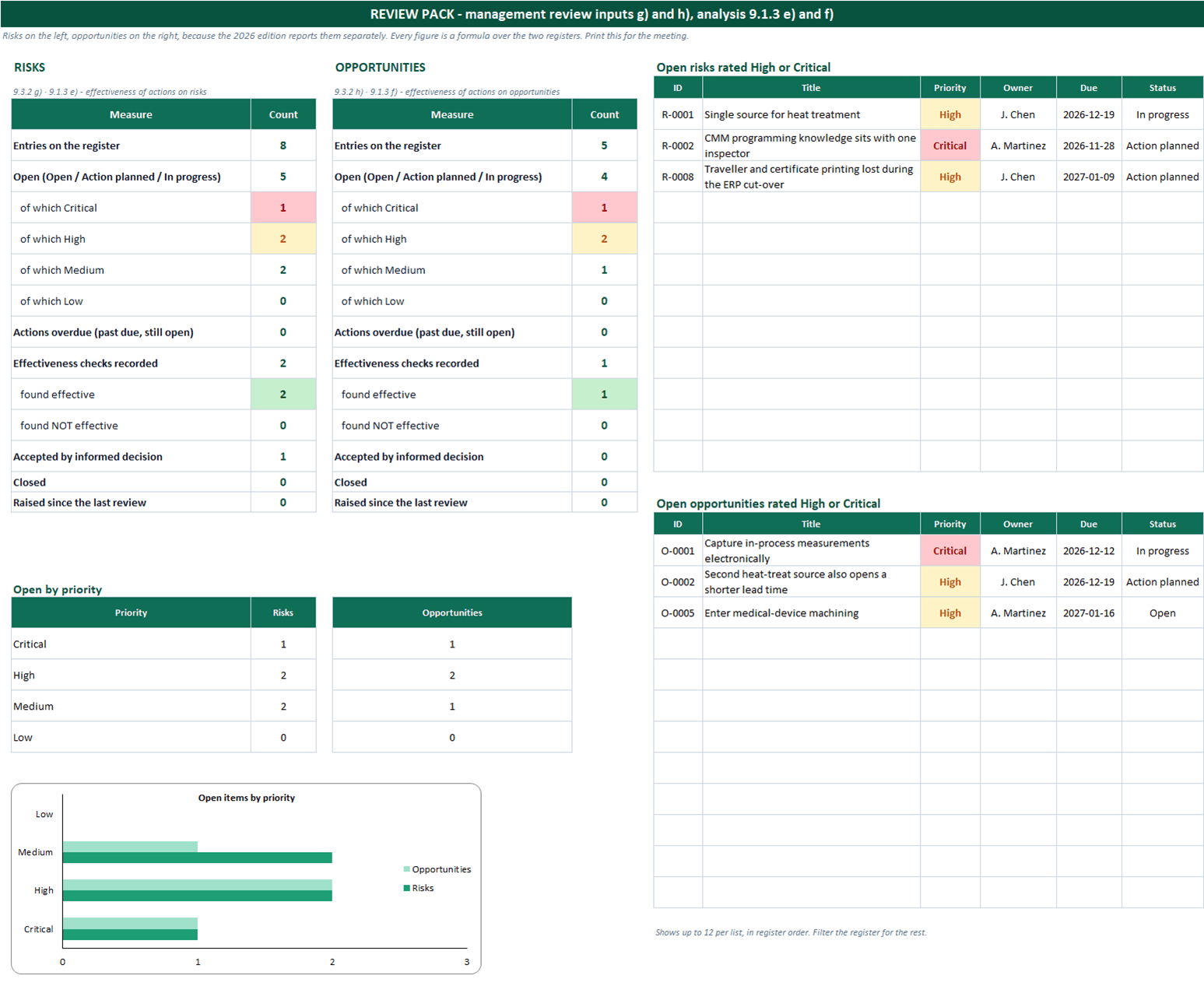
- REVIEW PACK: risks on the left, opportunities on the right — entries, open items by priority, actions overdue, effectiveness checks found effective or not, accepted and closed — the separate figures 9.3.2 g) and h) and 9.1.3 e) and f) ask for, plus the open items rated High or Critical and an open-by-priority chart. Print it for the meeting
- Sample entries from a machine shop on both registers — eight risks and five opportunities, from a single heat-treat source to a customer at 55% of revenue — so you see a filled row before you write your own
- Dropdowns wherever a list applies, dates and ratings validated, conditional colour on priority, residual score and overdue dates
- 100% macro-free and no array formulas — no "Enable Content" prompt. Excel 2010+ on Windows and Mac, and it opens in LibreOffice and Google Sheets
You get the Excel workbook (.xlsx) and a one-page start-here guide. Clause numbers point you to the standard; its text is copyrighted and not reproduced, so you still need a licensed copy of ISO 9001:2026.
Where this spreadsheet breaks
A register is a plan for things that have not happened yet. The hard part is keeping it alive once the audit is over:
1.It is rated once and never re-rated
The likelihoods were honest the evening you wrote them. Eighteen months later the top customer is 70% of revenue and the row still says Possible, because nobody owns the re-rating.
In NominalQC each risk and opportunity is a record with an owner and a due date. Due dates from every register feed the dashboard’s due-dates card and the Monday digest, so the review comes to the owner instead of waiting for the audit.
2.The actions live in a column
One column says what will be done and another says who. Neither of them tells anyone, and the due date turns red in a file nobody has open.
Actions in NominalQC are records: assignment emails the owner, due items appear on their dashboard, and the weekly digest lists what is overdue — so a missed date is visible before the audit finds it.
3.Management review asks two questions and gets one answer
Inputs g) and h) of 9.3.2 want the effectiveness of risk actions and of opportunity actions reported separately. A merged register, or a review held to the 2015 agenda, cannot produce that.
The management review in NominalQC is built to the 2026 text — all fourteen inputs are required before a review can be completed, each labelled with its own letter, and risks and opportunities are reported separately.
Who built this
I spent 16 years in manufacturing quality — machining, fabrication, assembly — and in every shop I ended up building the same Excel tools with macros because the software budget went elsewhere. These workbooks are the ones I kept rebuilding. Eventually I stopped rebuilding spreadsheets and built NominalQC instead — but the spreadsheet is still the right starting point for a lot of shops, so here they are, cleaned up and free.
Questions
Is it really free?
Yes. Click Download and the full workbook is yours — no email, no signup, no card. If you would rather have it sent to your inbox, there is an optional email link under the button; that path adds two short follow-up emails about running the process, then silence — unsubscribe anytime.
Does it work on Mac or older Excel?
Yes — this workbook is 100% macro-free, so there’s no "Enable Content" prompt and it works in Excel 2010 or later on Windows and Mac.
Can I change the lists and dropdowns?
Yes — every dropdown pulls from the CONFIG sheet (your people, work centers, categories), and it’s all editable with no code involved. That’s the point: it should match your process, not ours.
Does ISO 9001:2026 require a risk matrix or a risk score?
No. Annex A says risk-based thinking does not require a formal risk-management method or a documented risk process. The 5 × 5 scales and the priority bands in this workbook are a practical default that keeps prioritisation consistent, not a requirement. What a registrar wants is objective evidence that you determined your risks and opportunities, decided what to do about them, built the actions into your processes and checked whether they worked. Accepting a risk, with the reason written down, is a valid action.
Why are risks and opportunities on two sheets?
Because the 2026 edition made them two clauses, 6.1.2 and 6.1.3, with different notes on what an action can be, and because management review (9.3.2 g and h) and analysis (9.1.3 e and f) report on each separately. Two sheets that share one CONFIG and one review pack give you both figures without a filter.
Where do the risks come from?
From your context issues (4.1, which now includes climate change as an issue to consider), your interested parties and their requirements (4.2), and from the system running: nonconformities (10.2.1 asks corrective action to update risks and opportunities), audits, changes and management review. The Source and From columns record that link, which is the first thing an auditor traces.
Can I use it under ISO 9001:2015?
Yes. In the 2015 edition 6.1 is one clause, so you could keep everything on the risk register, but keeping opportunities separate costs nothing and means you are already in the 2026 shape when you transition. The ISO 9001:2026 gap analysis template on this site covers the rest of the move.
More free templates
Ready to skip the spreadsheet stage?
Inspections, NCRs, CAPAs, LPAs, and gauge calibration — free for one user, team plans from $59/month flat.
Create your free account