Free Template · from the makers of NominalQC, QC software for small manufacturers
Free quality alert template for Excel
Raise the alert and prove everyone saw it. Auto-numbered alerts, an acknowledgment matrix that shows exactly who is missing, a printable one-page alert with defect (NOK) vs OK photo boxes and a signature sheet, and a live dashboard. 100% macro-free.
Related: NCR log template for Excel (nonconformance tracking) · Document control template with read-and-understood sign-off
Free Excel template — no email, no signup.
This log, without the spreadsheet
In NominalQC, an open alert blocks the next inspection on the affected part until each person acknowledges — timestamped, with the photos right at the machine.
Try the live demoOpens on the real app with seeded data · no signup, no email · read-only · free for one user when you’re ready.
Prefer it in your inbox, with two short notes on using it?
What’s in the download
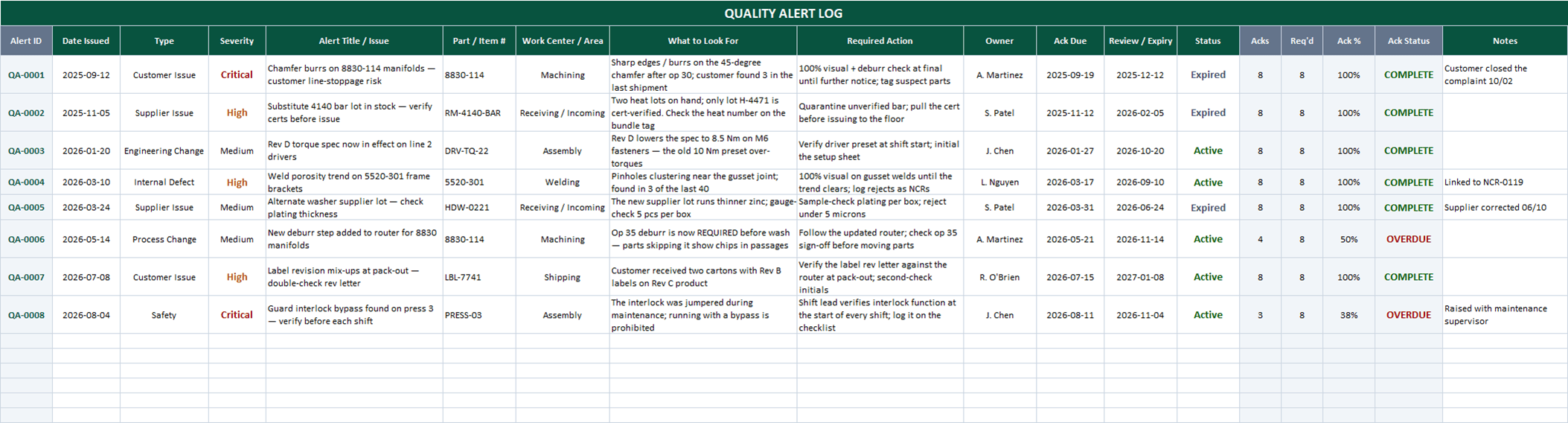
- 100-row alert log with auto-numbered IDs (QA-0001, QA-0002 …) — just type a title to start a row
- Acknowledgment tracking built in: acks counted per alert against your CONFIG people roster, with automatic COMPLETE / PENDING / OVERDUE status against each alert’s ack-due date
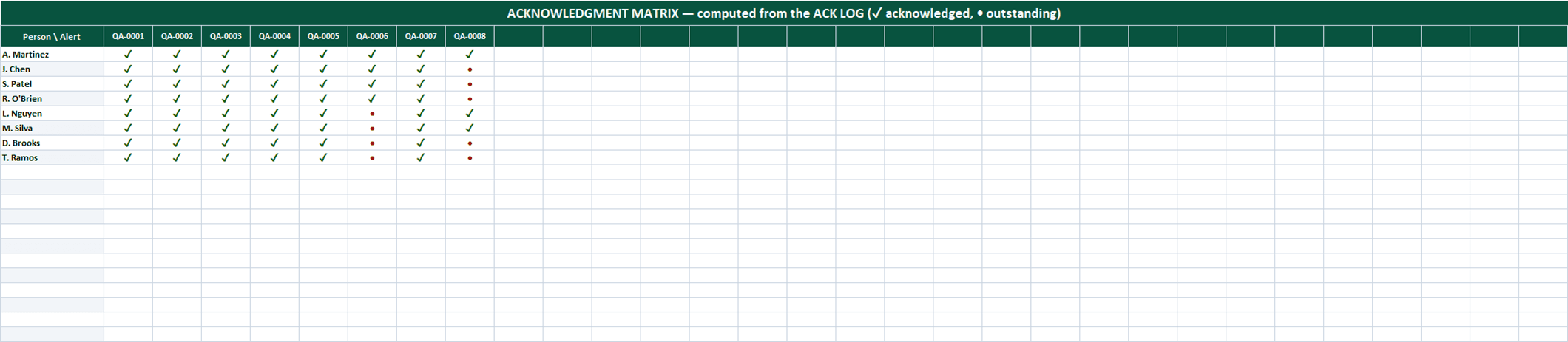
- ACK MATRIX — a live people-by-alert grid (✓ acknowledged, • outstanding) so you see exactly who still needs to sign off
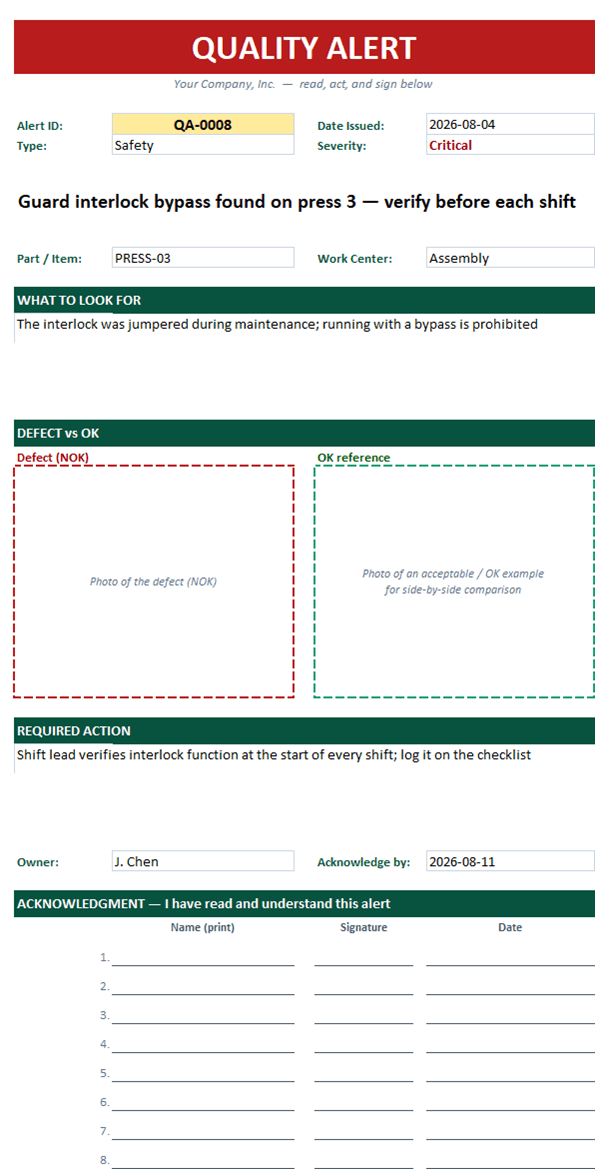
- Printable one-page alert, auto-filled from any Alert ID: red-banner header, what-to-look-for, defect (NOK) vs OK photo placeholder boxes, required action, and a 20-line signature sheet on page 2
- Dropdowns for alert type, severity, work center, owner, and status — all editable on the CONFIG sheet
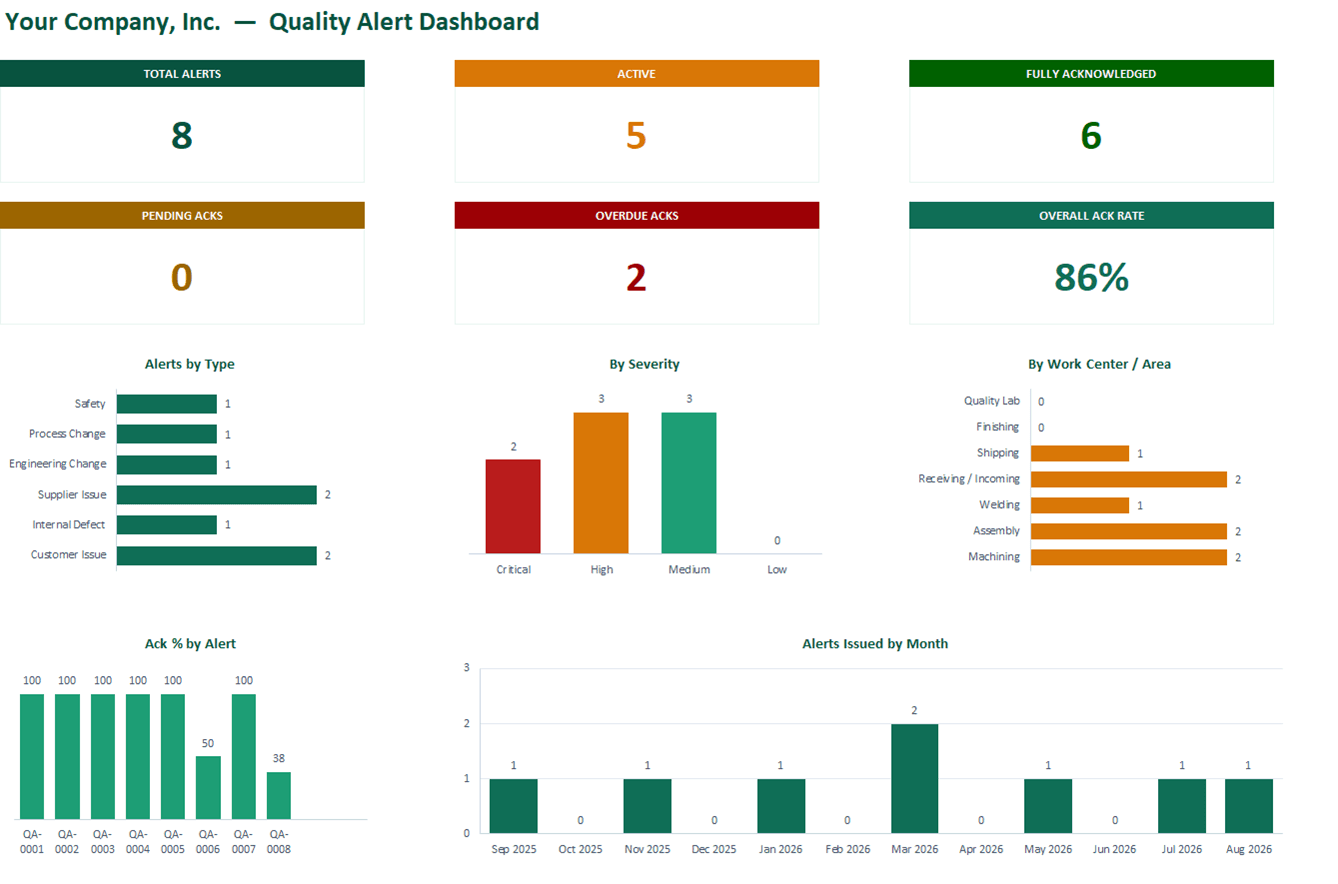
- Live dashboard: Total / Active / Fully Acknowledged / Pending / Overdue cards, overall ack rate, plus type, severity, work-center, ack-%-by-alert, and monthly-issued charts
- 100% macro-free — works in Excel 2010+ on Windows and Mac, no security prompts
You get the workbook (.xlsx) — its Instructions sheet is the quick-start. Sample data is included so you can see it working — delete it and the formulas refill on their own.
Where this spreadsheet breaks
A spreadsheet can track acknowledgments — it can’t collect them. The gaps show up fast:
1.Nobody is forced to look
The alert lives in a workbook and on a clipboard. The person about to inspect the affected part has no reason to open either — so the alert travels by word of mouth, or not at all.
In NominalQC an open alert blocks the next inspection on the affected part: a modal puts the watch-fors, containment, and defect photos in front of the inspector until they acknowledge.
2.One signature clears the whole shift
A signed sheet on a clipboard says someone saw it. It doesn’t say the second-shift inspector did — and chasing every name on the roster is a standing job.
NominalQC acknowledgments are per-person, pinned to the signed-in user with a timestamp — one inspector’s ack never clears the alert for anyone else.
3.The photos stay in a folder
The defect photo that makes the alert instantly recognizable lives in an email thread or a shared drive, not where the decision happens.
NominalQC keeps the NOK and OK reference photos on the alert itself — in the acknowledgment modal, at the machine, exactly when they matter.
Who built this
I spent 16 years in manufacturing quality — machining, fabrication, assembly — and in every shop I ended up building the same Excel tools with macros because the software budget went elsewhere. These workbooks are the ones I kept rebuilding. Eventually I stopped rebuilding spreadsheets and built NominalQC instead — but the spreadsheet is still the right starting point for a lot of shops, so here they are, cleaned up and free.
Questions
Is it really free?
Yes. Click Download and the full workbook is yours — no email, no signup, no card. If you would rather have it sent to your inbox, there is an optional email link under the button; that path adds two short follow-up emails about running the process, then silence — unsubscribe anytime.
Does it work on Mac or older Excel?
Yes — this workbook is 100% macro-free, so there’s no "Enable Content" prompt and it works in Excel 2010 or later on Windows and Mac.
What should a quality alert include?
Keep it to one page: what the problem is, which part and work center it affects, what to look for (with a defect photo and an OK example side by side), what to do right now, and who to ask. Then track acknowledgment by name — an alert nobody confirmed reading is just a poster. This template covers both halves: the printable alert page and the acknowledgment tracking.
Can I change the lists and dropdowns?
Yes — every dropdown pulls from the CONFIG sheet (your people, work centers, categories), and it’s all editable with no code involved. That’s the point: it should match your process, not ours.
More free templates
Ready to skip the spreadsheet stage?
Inspections, NCRs, CAPAs, LPAs, and gauge calibration — free for one user, team plans from $59/month flat.
Create your free account