Free Template · from the makers of NominalQC, QC software for small manufacturers
Free customer complaint log template for Excel
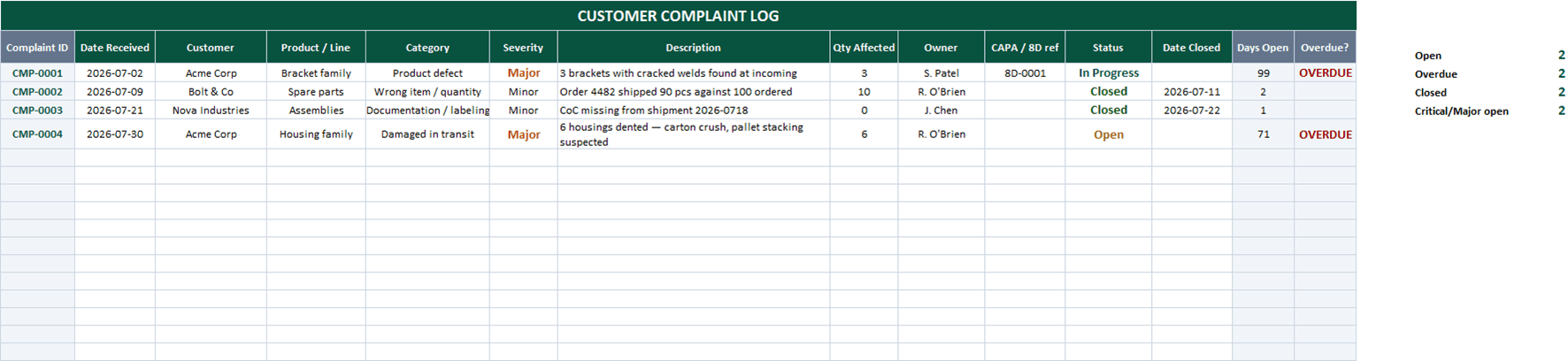
Every complaint, from intake to closure, with the clock running: type the description and the ID fills in, set your response promise once and the OVERDUE flag enforces it, and serious complaints carry their 8D or CAPA reference so the trail holds up later.
Related: NCR log template · CAPA log & dashboard · 8D problem-solving report
Free Excel template — no email, no signup.
This log, without the spreadsheet
In NominalQC, a complaint becomes a source-tagged NCR with one audit trail — owners get emailed, overdue work stays flagged, repeat offenders surface on the dashboard.
Try the live demoOpens on the real app with seeded data · no signup, no email · read-only · free for one user when you’re ready.
Prefer it in your inbox, with two short notes on using it?
What’s in the download
- 200-row complaint log with auto-numbered IDs (CMP-0001…) — type a description to start a row
- Configurable response promise (days) on CONFIG — complaints still open past it flag OVERDUE automatically
- Severity (Critical / Major / Minor) and category dropdowns with color coding — categories editable to your business
- CAPA / 8D reference column so escalated complaints keep their corrective-action trail
- Days-open counter, owner assignment, and live counts: open, overdue, closed, critical/major open
- Pairs with the free 8D Report and CAPA Log templates for complaints that earn real corrective action
- 100% macro-free — works in Excel 2010+ on Windows and Mac, no security prompts
You get the workbook (.xlsx) — its Instructions sheet is the quick-start. Sample data is included so you can see it working.
Where this spreadsheet breaks
A complaint log proves you listened. It can’t prove anything happened next:
1.The complaint and the defect never meet
The complaint sits in this log; the nonconforming product story lives somewhere else. Connecting "customer called" to "here’s what we found and did" is manual every time.
In NominalQC a complaint becomes an NCR with "Customer Complaint" as its source — disposition, containment, and any CAPA hang off the same record with one audit trail.
2.Follow-up runs on memory
The OVERDUE flag only warns whoever opens the file. A complaint aging past your response promise makes no sound.
NominalQC emails the owner when quality records land on their desk and keeps overdue work visibly flagged across the app — nobody has to remember to check a spreadsheet.
3.Trends hide in the rows
The third packaging complaint this quarter looks like rows 12, 19, and 31 — the pattern is invisible unless someone goes looking.
NominalQC’s dashboards chart nonconformances by category, source, and part automatically — repeat offenders surface on their own.
Who built this
I spent 16 years in manufacturing quality — machining, fabrication, assembly — and in every shop I ended up building the same Excel tools with macros because the software budget went elsewhere. These workbooks are the ones I kept rebuilding. Eventually I stopped rebuilding spreadsheets and built NominalQC instead — but the spreadsheet is still the right starting point for a lot of shops, so here they are, cleaned up and free.
Questions
Is it really free?
Yes. Click Download and the full workbook is yours — no email, no signup, no card. If you would rather have it sent to your inbox, there is an optional email link under the button; that path adds two short follow-up emails about running the process, then silence — unsubscribe anytime.
Does it work on Mac or older Excel?
Yes — this workbook is 100% macro-free, so there’s no "Enable Content" prompt and it works in Excel 2010 or later on Windows and Mac.
Does every complaint need a CAPA?
No — and trying to CAPA everything is how CAPA programs drown. Log every complaint, contain and correct every legitimate one, and reserve formal corrective action for what earns it: safety issues, repeat patterns, serious escapes, or a customer explicitly requesting an 8D. The severity column plus the CAPA/8D reference column exist to make that triage visible.
Can I change the lists and dropdowns?
Yes — every dropdown pulls from the CONFIG sheet (your people, work centers, categories), and it’s all editable with no code involved. That’s the point: it should match your process, not ours.
More free templates
Ready to skip the spreadsheet stage?
Inspections, NCRs, CAPAs, LPAs, and gauge calibration — free for one user, team plans from $59/month flat.
Create your free account