Free Template · from the makers of NominalQC, QC software for small manufacturers
Free document register & revision log template for Excel
Control of documents without the software: type a title and the Doc # (DOC-0001…) fills in — or keep the numbering you already use, typed numbers win. Set a review interval and the Next Review Due date computes with OVERDUE / DUE SOON flags, and the revision log flags any approval missing an approver. Plus a printable read-and-understood sign-off sheet. 100% macro-free.
Related: SOP template · Work instruction template · ISO 9001:2026 gap analysis
Free Excel template — no email, no signup.

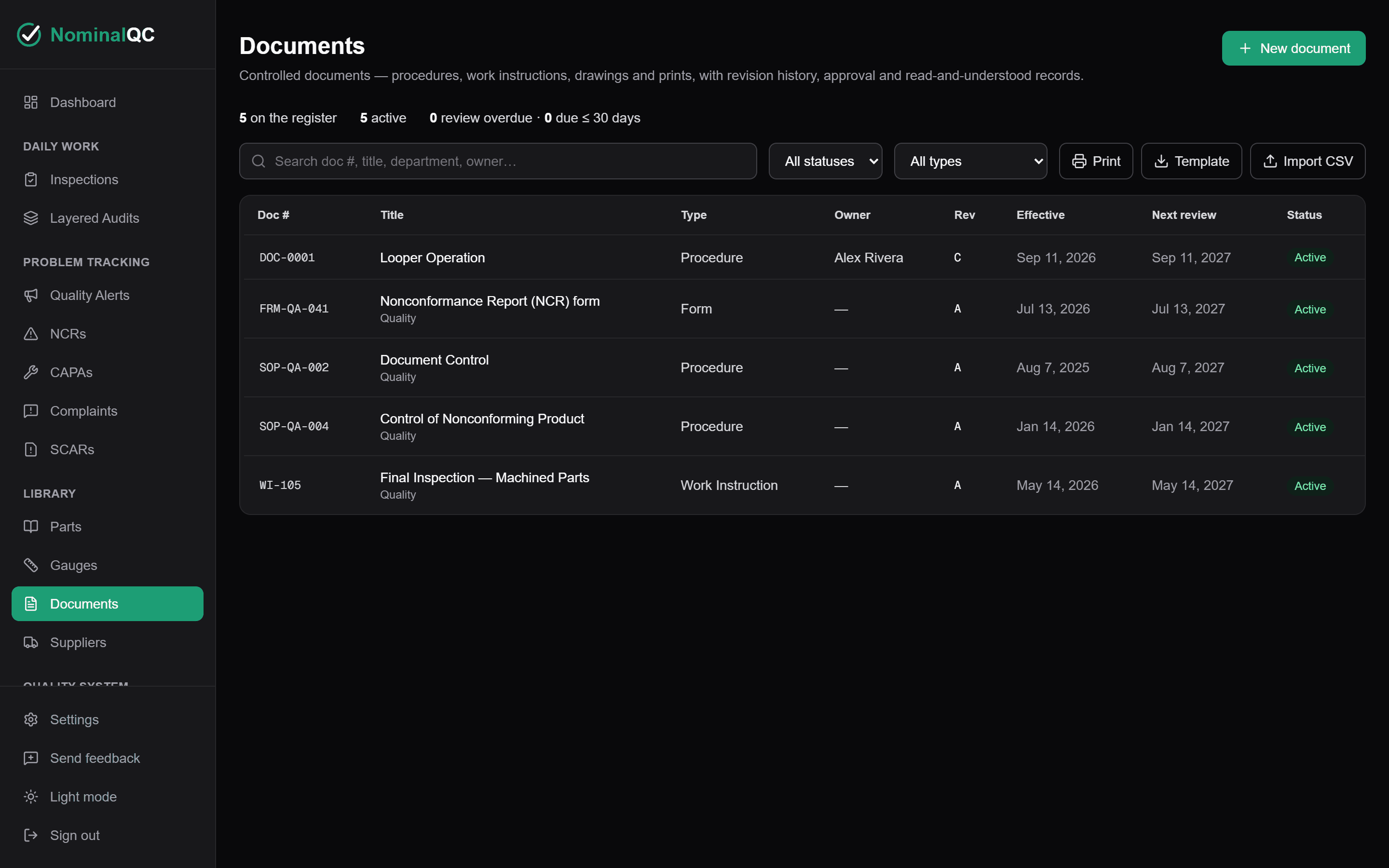
This log, without the spreadsheet
NominalQC pushes changes to the floor with blocking alerts and per-person, timestamped acknowledgments — you see exactly who’s confirmed and who’s outstanding.
Try the live demoOpens on the real app with seeded data · no signup, no email · read-only · free for one user when you’re ready.
Prefer it in your inbox, with two short notes on using it?
What’s in the download
- 200-row controlled document register with auto-numbered IDs (DOC-0001, DOC-0002 …) — or type your existing document numbers straight in; your nomenclature wins, and the auto-number prefix is editable on CONFIG
- Automatic Next Review Due date from effective date + review interval, with color-coded OK / DUE SOON / OVERDUE flags — obsolete documents drop out of review scope but stay on the register
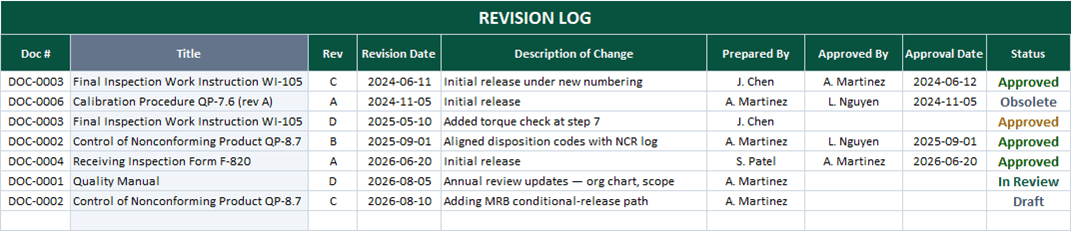
- Revision log with description-of-change, prepared-by, approved-by, and approval-date columns — document titles look themselves up from the register
- Honesty flag built in: a revision marked Approved with no approver or approval date on record turns yellow automatically
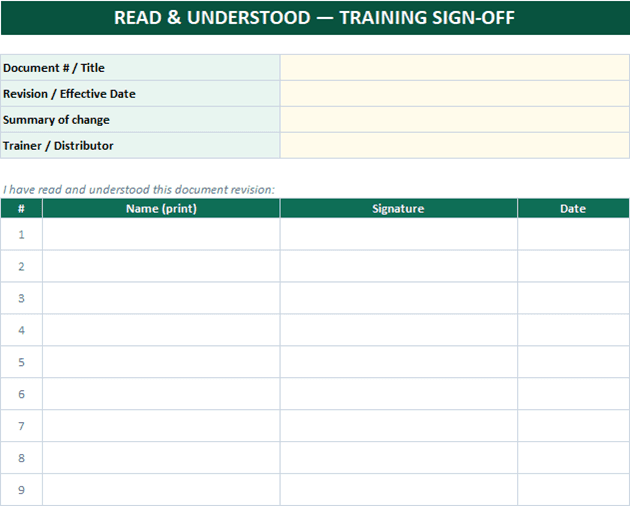
- Printable READ & UNDERSTOOD sign-off sheet — fill the header, print one per revision, and collect signatures as your distribution evidence
- Dropdowns for document type, owner, and department — all editable on the CONFIG sheet
- Counts strip: total documents, active, review overdue, due within 30 days
- 100% macro-free — works in Excel 2010+ on Windows and Mac, no security prompts
You get the workbook (.xlsx) — its Instructions sheet is the quick-start. Sample data is included so you can see it working — delete it and the formulas refill on their own.
Where this spreadsheet breaks
A register knows which revision is current. It can’t make the shop floor agree — and that gap is where audit findings come from:
1.The floor copy is two revisions old
The register says rev E is current. The laminated copy at the station is rev C, and nothing about a spreadsheet in the quality office can reach the person working from it.
When a change has to reach the floor now, a NominalQC quality alert puts it in front of the inspector and blocks the next inspection on the affected part until they acknowledge it.
2.The sign-off sheet proves almost nothing
A signature page in a binder says somebody saw the revision. It doesn’t say the second-shift inspector did — and when the auditor picks a name, you’re flipping pages hoping.
NominalQC acknowledgments are per-person, pinned to the signed-in user with a timestamp — you see exactly who has confirmed and who is still outstanding, without chasing a clipboard.
3.Every date on the register is just a cell
Effective dates, approval dates, review dates — anyone can type or overtype any of them, and the register can’t tell a real approval from a backdated one.
NominalQC backs controlled dates with logged events: a gauge’s calibration date, for example, comes from a calibration event with the certificate attached — not a cell anyone can overwrite.
Who built this
I spent 16 years in manufacturing quality — machining, fabrication, assembly — and in every shop I ended up building the same Excel tools with macros because the software budget went elsewhere. These workbooks are the ones I kept rebuilding. Eventually I stopped rebuilding spreadsheets and built NominalQC instead — but the spreadsheet is still the right starting point for a lot of shops, so here they are, cleaned up and free.
Questions
Is it really free?
Yes. Click Download and the full workbook is yours — no email, no signup, no card. If you would rather have it sent to your inbox, there is an optional email link under the button; that path adds two short follow-up emails about running the process, then silence — unsubscribe anytime.
Does it work on Mac or older Excel?
Yes — this workbook is 100% macro-free, so there’s no "Enable Content" prompt and it works in Excel 2010 or later on Windows and Mac.
Which documents belong on the register?
Anything where working from the wrong revision can produce a wrong part or a failed audit: the quality manual, procedures, work instructions, forms, drawings and customer prints, and external standards. Include customer-controlled documents too — you don’t control their revisions, but you must control which revision your shop is working to. If it isn’t on the register, its “current revision” is a rumor.
We already have document numbers and naming — do we have to renumber?
No. The auto-number (DOC-0001…) is only a default for shops starting fresh. Type your existing numbers straight into the Doc # column — QP-8.7, WI-105, whatever your scheme is — and the revision-log lookup, review flags, and counts all work the same. The auto-number prefix is editable on the CONFIG sheet, and document types are an editable list there too, so the register speaks your language, not ours. The sample data includes a customer print carrying its own number.
Can I change the lists and dropdowns?
Yes — every dropdown pulls from the CONFIG sheet (your people, work centers, categories), and it’s all editable with no code involved. That’s the point: it should match your process, not ours.
More free templates
Ready to skip the spreadsheet stage?
Inspections, NCRs, CAPAs, LPAs, and gauge calibration — free for one user, team plans from $59/month flat.
Create your free account