Free Template · from the makers of NominalQC, QC software for small manufacturers
Free receiving inspection log for Excel
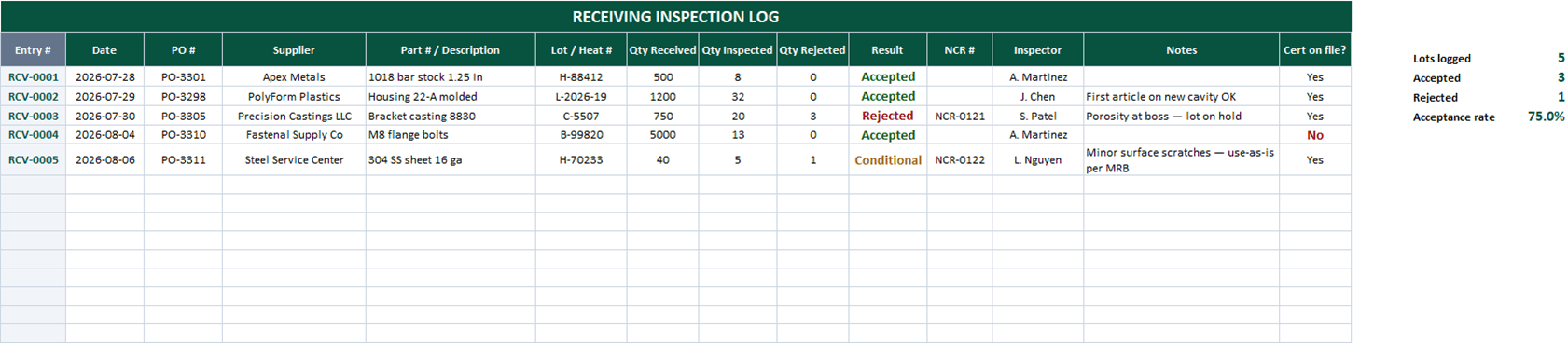
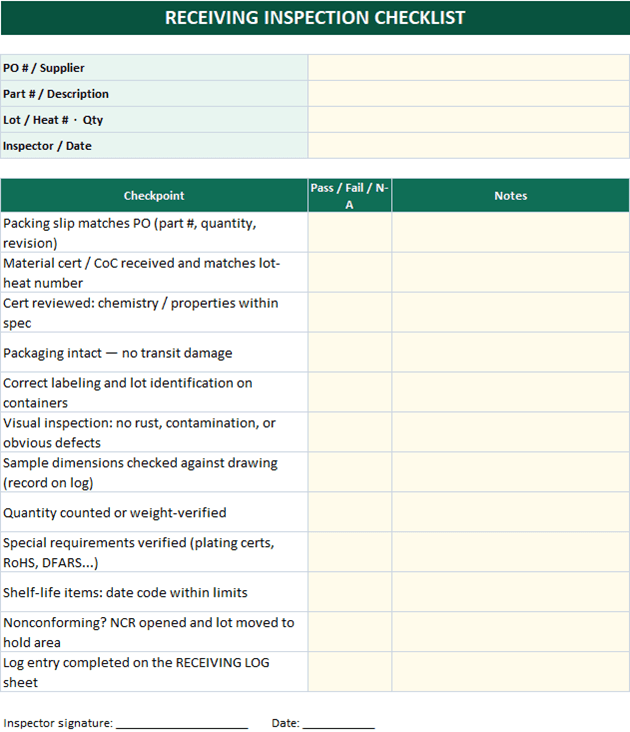
Incoming inspection with a paper trail: one row per lot with the result color-coded, rejected lots carrying their NCR number, certs tracked, acceptance rate live — and a printable 12-point checklist that makes "receiving looked at it" mean something specific.
Related: Supplier scorecard & ASL · Gauge calibration log · First article inspection report
Free Excel template — no email, no signup.
This log, without the spreadsheet
NominalQC runs receiving inspections against enforced plans — and a failed inspection raises the NCR in one click, pre-linked and pre-filled.
Imports in one click. Outgrown the sheet? Save the RECEIVING LOG tab as CSV and import it on the Inspections page — the app reads this workbook’s columns as they are.
Try the live demoOpens on the real app with seeded data · no signup, no email · read-only · free for one user when you’re ready.
Prefer it in your inbox, with two short notes on using it?
What’s in the download
- 200-row receiving log with auto entry numbers (RCV-0001…) — type a part to start a row
- Accept / Rejected / Conditional / Pending results, color-coded, with an NCR reference column for rejects
- Qty received / inspected / rejected columns and a cert-on-file flag that turns red on "No"
- Supplier and inspector dropdowns editable on CONFIG
- Live counts: lots logged, accepted, rejected, and running acceptance rate
- Printable 12-point receiving checklist — packing slip, certs, visual, dims, count, shelf life, NCR handling — with a signature line
- 100% macro-free — works in Excel 2010+ on Windows and Mac, no security prompts
You get the workbook (.xlsx) — its Instructions sheet is the quick-start. Sample data is included so you can see it working.
Where this spreadsheet breaks
A receiving log records what the inspector decided. It has no opinion about how they decided:
1."Inspected" means whatever today’s inspector meant
Without a plan behind the log, sample sizes and checked dimensions drift person to person. The log says 8 pieces — against what?
NominalQC runs inspections against defined plans — characteristics, gauges, sample rules — with enforcement modes that decide how hard the plan pushes back.
2.The reject and the NCR are two documents
A rejected lot means writing the log row, then writing the NCR, then keeping their stories consistent by hand.
In NominalQC a failed inspection raises the NCR in one click — pre-linked and pre-filled, with a duplicate guard.
3.Supplier performance is a year-end archaeology dig
The acceptance-rate cell is a start, but per-supplier trends mean pivot tables someone has to build and rebuild.
NominalQC dashboards break nonconformances down by source and supplier continuously — the scorecard conversation writes itself.
Who built this
I spent 16 years in manufacturing quality — machining, fabrication, assembly — and in every shop I ended up building the same Excel tools with macros because the software budget went elsewhere. These workbooks are the ones I kept rebuilding. Eventually I stopped rebuilding spreadsheets and built NominalQC instead — but the spreadsheet is still the right starting point for a lot of shops, so here they are, cleaned up and free.
Questions
Is it really free?
Yes. Click Download and the full workbook is yours — no email, no signup, no card. If you would rather have it sent to your inbox, there is an optional email link under the button; that path adds two short follow-up emails about running the process, then silence — unsubscribe anytime.
Does it work on Mac or older Excel?
Yes — this workbook is 100% macro-free, so there’s no "Enable Content" prompt and it works in Excel 2010 or later on Windows and Mac.
How much incoming inspection is enough?
Match effort to risk. COTS hardware from a solid distributor might need a count and cert check; a new casting supplier gets dimensional sampling until they’ve earned trust. The log supports that range — the Qty Inspected column and Conditional result exist so skip-lot and reduced inspection stay visible decisions, not silent ones. Track the acceptance rate per supplier and adjust.
Can I change the lists and dropdowns?
Yes — every dropdown pulls from the CONFIG sheet (your people, work centers, categories), and it’s all editable with no code involved. That’s the point: it should match your process, not ours.
More free templates
Ready to skip the spreadsheet stage?
Inspections, NCRs, CAPAs, LPAs, and gauge calibration — free for one user, team plans from $59/month flat.
Create your free account