Free Template · from the makers of NominalQC, QC software for small manufacturers
Free supplier scorecard + ASL template for Excel
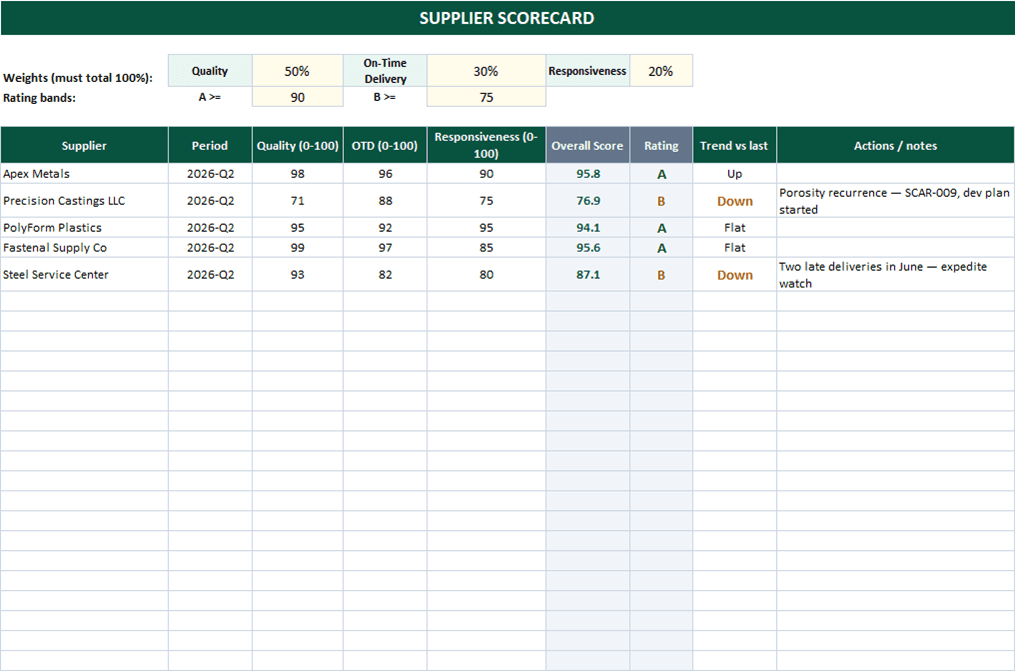
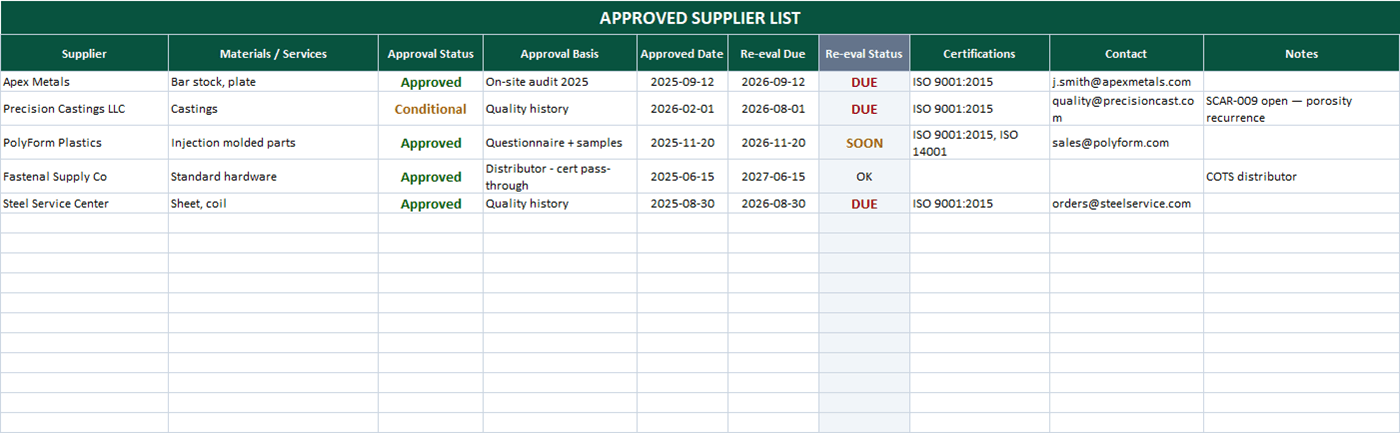
The two supplier documents every ISO 9001 shop needs, connected: an approved supplier list that flags when re-evaluations come due, and a weighted scorecard where you set the quality / delivery / responsiveness weights once and every supplier gets an automatic A/B/C rating.
Related: Receiving inspection log · NCR log template · Internal audit checklist
Free Excel template — no email, no signup.
This log, without the spreadsheet
NominalQC tracks NCRs by supplier continuously — the scorecard’s quality number comes from dispositioned records, not quarter-end recollection.
Try the live demoOpens on the real app with seeded data · no signup, no email · read-only · free for one user when you’re ready.
Prefer it in your inbox, with two short notes on using it?
What’s in the download
- Approved Supplier List: status (Approved / Conditional / Probation / Disqualified), approval basis, certifications, and contacts
- Automatic re-evaluation flags — DUE in red when past date, SOON within 60 days
- Weighted scorecard: score Quality, On-Time Delivery, and Responsiveness 0–100; the weighted overall computes automatically
- Adjustable weights with a guard that warns when they don’t total 100%
- Automatic A/B/C ratings with editable thresholds (default A ≥ 90, B ≥ 75), color-coded, plus a trend column
- Guidance built in: feed Quality from your receiving log’s acceptance rate, OTD from delivery data
- 100% macro-free — works in Excel 2010+ on Windows and Mac, no security prompts
You get the workbook (.xlsx) — its Instructions sheet is the quick-start. Sample suppliers are included so you can see it working.
Where this spreadsheet breaks
A scorecard presents the numbers. The work is getting honest numbers into it:
1.The quality score is an opinion
Without receiving data feeding it, the 0–100 quality column becomes "how do we feel about them lately" — and the supplier who argues loudest wins the review.
NominalQC tracks NCRs by source and supplier continuously — the quality number comes from dispositioned records, not recollection.
2.Quarterly scoring, daily problems
The scorecard updates when someone updates it. A supplier can ship three bad lots between reviews without the trend showing anywhere.
NominalQC’s dashboards reflect every new NCR the moment it’s logged — the supplier conversation can happen when the problem starts, not at quarter-end.
3.The evidence for the rating is scattered
When a supplier disputes a C rating, backing it up means digging receipts, NCRs, and emails out of three systems.
In NominalQC every supplier-sourced NCR carries its part, lot, disposition, photos, and dates — the rating’s evidence is one filtered list away.
Who built this
I spent 16 years in manufacturing quality — machining, fabrication, assembly — and in every shop I ended up building the same Excel tools with macros because the software budget went elsewhere. These workbooks are the ones I kept rebuilding. Eventually I stopped rebuilding spreadsheets and built NominalQC instead — but the spreadsheet is still the right starting point for a lot of shops, so here they are, cleaned up and free.
Questions
Is it really free?
Yes. Click Download and the full workbook is yours — no email, no signup, no card. If you would rather have it sent to your inbox, there is an optional email link under the button; that path adds two short follow-up emails about running the process, then silence — unsubscribe anytime.
Does it work on Mac or older Excel?
Yes — this workbook is 100% macro-free, so there’s no "Enable Content" prompt and it works in Excel 2010 or later on Windows and Mac.
What should the quality score be based on?
The cleanest input is lot acceptance rate from receiving (accepted ÷ total), which the free Receiving Inspection Log computes for you. Shops wanting more resolution use a PPM-style defect rate or weight by NCR severity. Whatever you choose, write it down and apply it to every supplier the same way — a documented method is what turns a scorecard from opinion into evidence.
Can I change the lists and dropdowns?
Yes — every dropdown pulls from the CONFIG sheet (your people, work centers, categories), and it’s all editable with no code involved. That’s the point: it should match your process, not ours.
More free templates
Ready to skip the spreadsheet stage?
Inspections, NCRs, CAPAs, LPAs, and gauge calibration — free for one user, team plans from $59/month flat.
Create your free account