Free Template · from the makers of NominalQC, QC software for small manufacturers
Free NCR log template for Excel
The nonconformance log every shop ends up building — already built. Auto-numbered NCRs, defect categories and dispositions from dropdowns, automatic aging and OVERDUE flags, estimated cost tracking, and a live dashboard. 100% macro-free.
Related: CAPA log & dashboard · Customer complaint log · Quality alert template
Free Excel template — no email, no signup.
This log, without the spreadsheet
In NominalQC, a failed inspection raises a pre-filled NCR in one click — duplicate-guarded, edit-logged, with hold tags that print straight from the record.
Try the live demoOpens on the real app with seeded data · no signup, no email · read-only · free for one user when you’re ready.
Prefer it in your inbox, with two short notes on using it?
What’s in the download
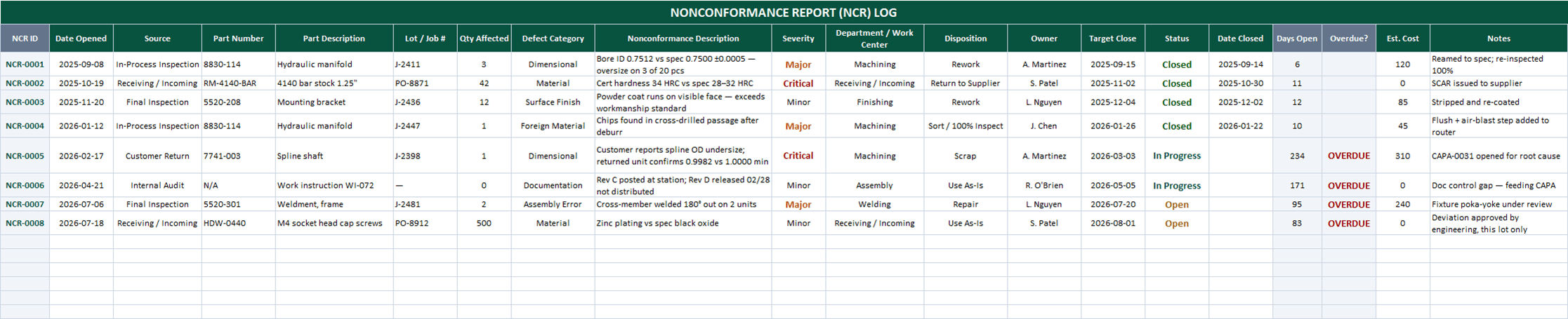
- 200-row NCR log with auto-numbered IDs (NCR-0001, NCR-0002 …) — just type a part number to start a row
- Dropdowns for source, defect category, severity, department, disposition (rework, scrap, use-as-is, RTV…), owner, and status — all editable on the CONFIG sheet
- Automatic Days Open counter and OVERDUE flag against each NCR’s target close date
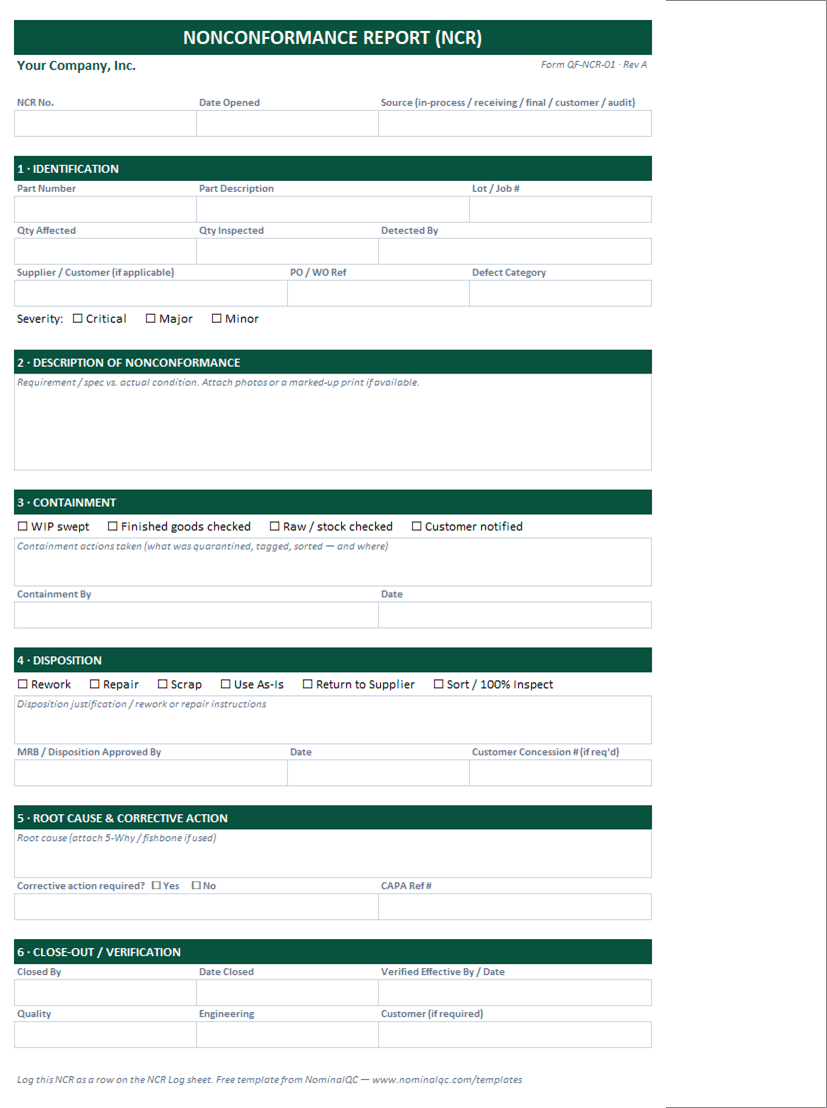
- Printable one-page NCR report form — identification, containment checklist, MRB disposition sign-off, root cause / CAPA reference, and close-out verification
- Estimated cost column feeding a total nonconformance cost KPI
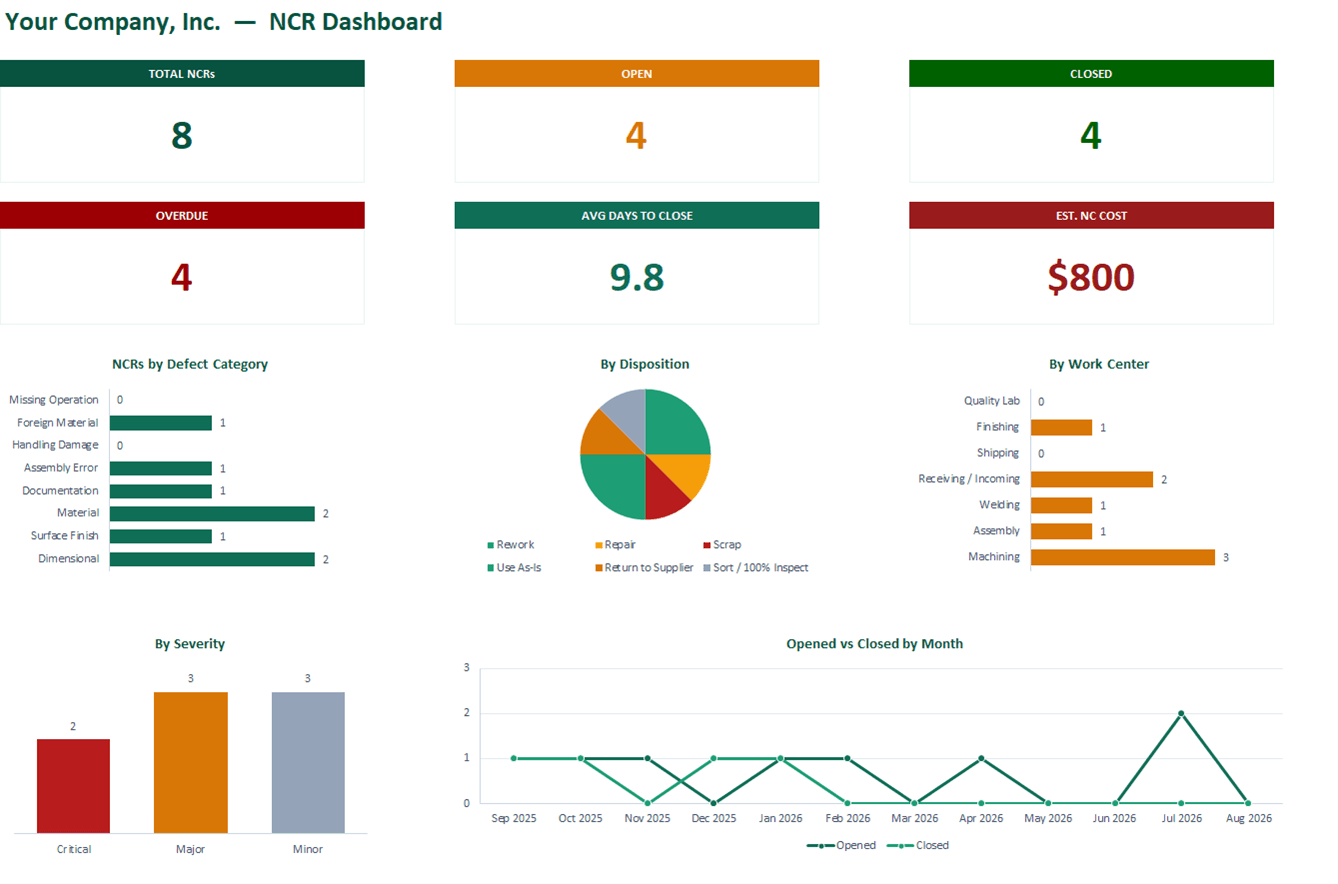
- Live dashboard: Total / Open / Closed / Overdue cards, average days-to-close, estimated NC cost
- Defect category, disposition, work center, severity, and monthly Opened-vs-Closed charts
- 100% macro-free — works in Excel 2010+ on Windows and Mac, no security prompts
You get the workbook (.xlsx) — its Instructions sheet is the quick-start. Sample data is included so you can see it working — delete it and the formulas refill on their own.
Where this spreadsheet breaks
An NCR log tells you what already went wrong. The gaps show up in what it can’t do:
1.The NCR starts as retyping
The inspection that caught the defect lives somewhere else — so part numbers, quantities, and defect descriptions get copied by hand, or the NCR just doesn’t get written.
In NominalQC a failed inspection raises a pre-linked, pre-filled NCR in one click — with a duplicate guard that surfaces the existing NCR instead of creating a second.
2.Closed rows are still editable
Anyone can quietly reword a disposition or change a quantity months later, and there’s no trace. That’s the first thing a good auditor pokes at.
NominalQC locks a closed NCR’s details until it’s formally reopened, and every edit is logged by name in the activity feed.
3.The suspect material keeps moving
A row in a spreadsheet doesn’t stop a cart. Containment depends on someone hand-writing a hold tag and hoping it stays attached.
NominalQC prints hold tags and NCR placards pre-filled from the record — part, description, quantity, and date auto-filled, with barcode or QR back to the NCR.
Who built this
I spent 16 years in manufacturing quality — machining, fabrication, assembly — and in every shop I ended up building the same Excel tools with macros because the software budget went elsewhere. These workbooks are the ones I kept rebuilding. Eventually I stopped rebuilding spreadsheets and built NominalQC instead — but the spreadsheet is still the right starting point for a lot of shops, so here they are, cleaned up and free.
Questions
Is it really free?
Yes. Click Download and the full workbook is yours — no email, no signup, no card. If you would rather have it sent to your inbox, there is an optional email link under the button; that path adds two short follow-up emails about running the process, then silence — unsubscribe anytime.
Does it work on Mac or older Excel?
Yes — this workbook is 100% macro-free, so there’s no "Enable Content" prompt and it works in Excel 2010 or later on Windows and Mac.
What should go in an NCR log?
At minimum: an ID, date, the part and lot affected, quantity, what’s wrong (category plus description), severity, the disposition decision, who owns it, and status through closure. This template adds the things shops learn to want later — target close dates with overdue flags, estimated cost, and source tracking — because they’re much easier to have from day one.
Can I change the lists and dropdowns?
Yes — every dropdown pulls from the CONFIG sheet (your people, work centers, categories), and it’s all editable with no code involved. That’s the point: it should match your process, not ours.
More free templates
Ready to skip the spreadsheet stage?
Inspections, NCRs, CAPAs, LPAs, and gauge calibration — free for one user, team plans from $59/month flat.
Create your free account