Free Template · from the makers of NominalQC, QC software for small manufacturers
Free gauge calibration log template for Excel
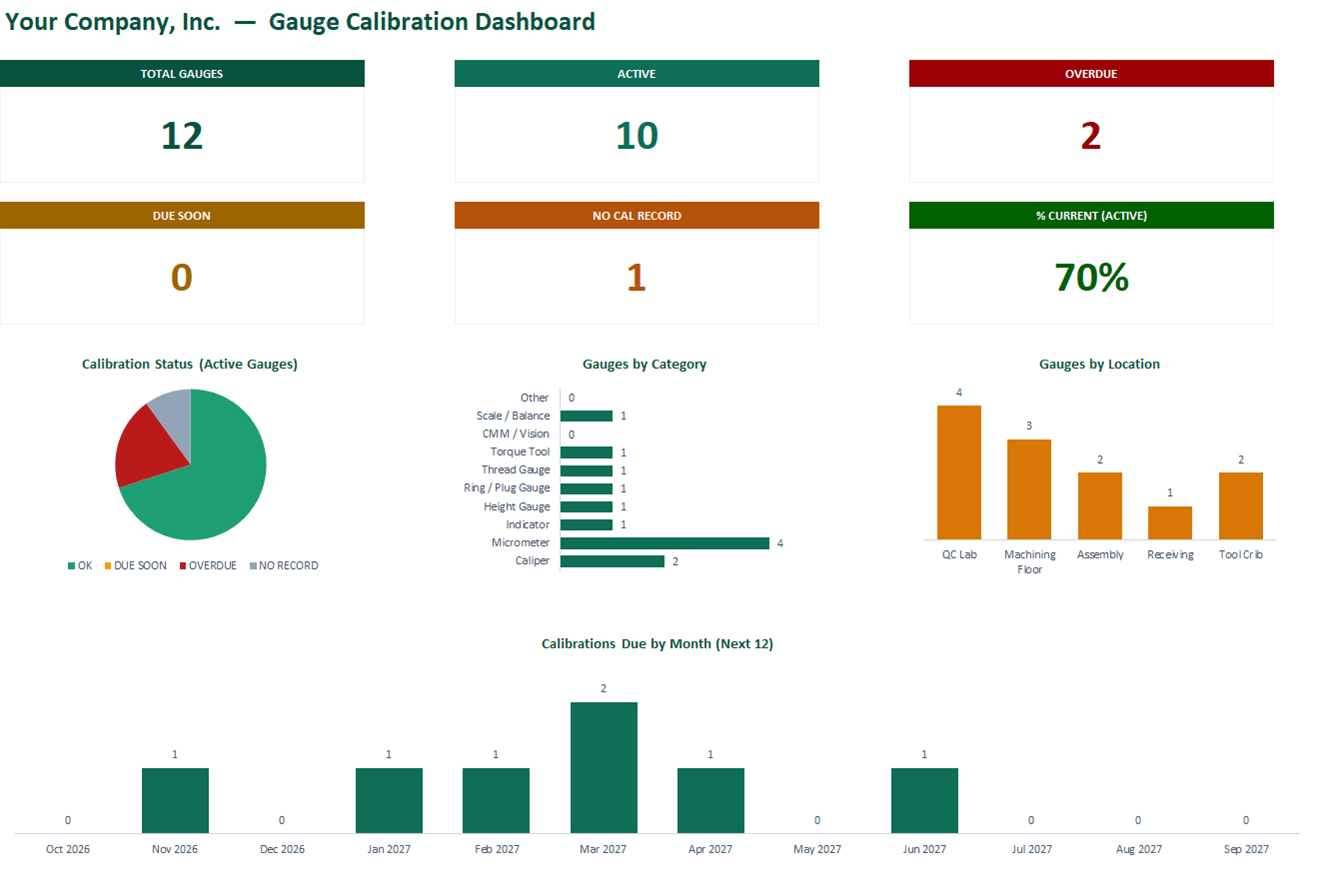
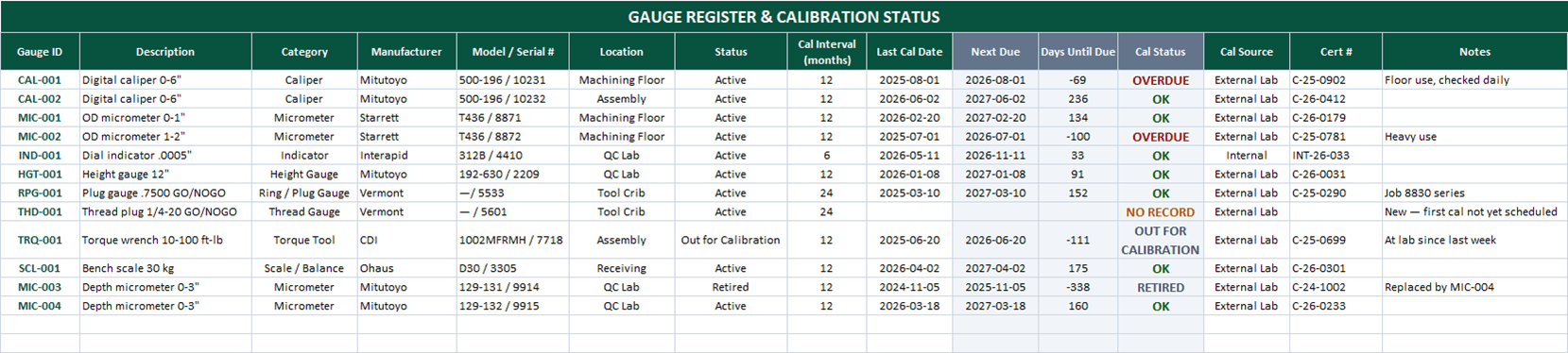
A gauge register that does the date math for you: enter the interval and last cal date, and Next Due, the days-until-due countdown, and color-coded OVERDUE / DUE SOON / NO RECORD flags compute automatically — with a cal history sheet and live dashboard. 100% macro-free.
Related: Receiving inspection log · First article inspection report · Cp/Cpk calculator
Free Excel template — no email, no signup.
This log, without the spreadsheet
In NominalQC, calibration dates come only from logged calibration events — and a gauge with no valid cal can’t even be selected on an inspection.
Imports in one click. Outgrown the sheet? Save the Gauge Register tab as CSV and import it on the Gauges page, then the Cal History tab the same way — the app reads this workbook’s columns as they are, cert numbers and all.
Try the live demoOpens on the real app with seeded data · no signup, no email · read-only · free for one user when you’re ready.
Prefer it in your inbox, with two short notes on using it?
What’s in the download
- 200-row gauge register: ID, description, category, manufacturer, serial, location, and status
- Automatic Next Due (interval + last cal date), days-until-due countdown, and color-coded OVERDUE / DUE SOON / OK / NO RECORD flags
- Configurable "due soon" warning window (default 30 days) on the CONFIG sheet
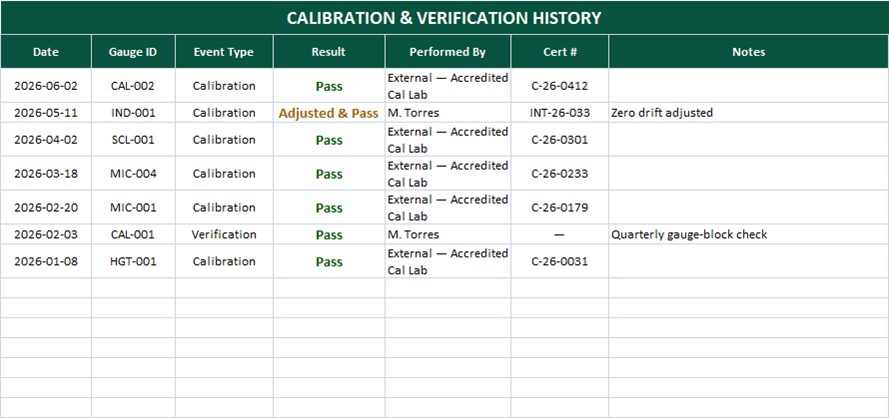
- Cal History sheet — every calibration and verification event with result and certificate number
- Live dashboard: Total / Active / Overdue / Due-Soon cards, no-record count, % current
- Status, category, location, and calibrations-due-by-month charts
- 100% macro-free — works in Excel 2010+ on Windows and Mac, no security prompts
You get the workbook (.xlsx) — its Instructions sheet is the quick-start. Sample data is included so you can see it working — delete it and the formulas refill on their own.
Where this spreadsheet breaks
A cal log knows which gauges are overdue. What it can’t do is anything about it:
1.Overdue gauges keep measuring
The register flags OVERDUE in red — and the caliper stays in the inspector’s pocket. Nothing connects the spreadsheet to the moment of measurement.
In NominalQC, gauges with no valid calibration can’t be selected on the inspection form at all — and optional hard-stop policies refuse the save on any overdue gauge.
2.Cal dates get pencil-whipped
The Last Cal Date is a typed cell. The audit-week temptation to "fix" a date is real, and nothing in a spreadsheet stops it or shows it happened.
In NominalQC calibration dates are never hand-typed — they derive only from logged calibration events, and deleting an event rolls the date back to the prior evidence.
3.Nobody watches the countdown
The due-soon column only warns people who open the file. Gauges drift overdue between the monthly look.
NominalQC emails a weekly due-soon digest and flags overdue gauges in color across the app — no one has to remember to check.
Who built this
I spent 16 years in manufacturing quality — machining, fabrication, assembly — and in every shop I ended up building the same Excel tools with macros because the software budget went elsewhere. These workbooks are the ones I kept rebuilding. Eventually I stopped rebuilding spreadsheets and built NominalQC instead — but the spreadsheet is still the right starting point for a lot of shops, so here they are, cleaned up and free.
Questions
Is it really free?
Yes. Click Download and the full workbook is yours — no email, no signup, no card. If you would rather have it sent to your inbox, there is an optional email link under the button; that path adds two short follow-up emails about running the process, then silence — unsubscribe anytime.
Does it work on Mac or older Excel?
Yes — this workbook is 100% macro-free, so there’s no "Enable Content" prompt and it works in Excel 2010 or later on Windows and Mac.
How do I set calibration intervals?
Enter the interval in months per gauge on the register — 12 months is a common default for hand tools, with shorter intervals for heavily used or critical gauges and longer for stable reference standards. Base it on usage, environment, and history: if a gauge keeps passing calibration untouched, the interval can often stretch; if it needs adjustment every time, shorten it.
Does it track verifications as well as calibrations?
Yes — the Cal History sheet logs both event types (calibration and verification) with result and certificate number, so in-house gauge-block checks between external cals have a home too.
Can I change the lists and dropdowns?
Yes — every dropdown pulls from the CONFIG sheet (your people, work centers, categories), and it’s all editable with no code involved. That’s the point: it should match your process, not ours.
More free templates
Ready to skip the spreadsheet stage?
Inspections, NCRs, CAPAs, LPAs, and gauge calibration — free for one user, team plans from $59/month flat.
Create your free account