QMS for small manufacturers
Quality control built for the shop floor.
Stop managing inspections and NCRs on paper. NominalQC gives machine shops, job shops, and small manufacturers an audit-ready quality management system they can use on day one — no training, no IT, no $500/month contract.
Free for one userNo credit cardNo sales callYour data exports anytime
01 · The symptoms
Paper-based quality control is costing you.
Every shop knows the symptoms. The gates below close them.
Failed audits
Missing signatures, lapsed cal dates, unclosed NCRs — paper hides the gaps until the auditor finds them.
With the gates
Nothing unclosed goes quiet — open NCRs and overdue calibrations sit on the dashboard until they’re dealt with.
Customer escapes
The same defect ships twice because nothing connects this week’s rejects to last month’s. The customer finds it first.
With the gates
A failed inspection raises the NCR on the spot, and a quality alert puts the defect in front of the crew — acknowledged by name.
Customer dissatisfaction
One unresolved NCR at the wrong account, and the next RFQ quietly goes to the shop across town.
With the gates
A CAPA can’t close without a root cause, actions, and a verified effectiveness check — the answer your customer’s SQE is actually asking for.
Built by quality professionals for quality professionals — these three cost us sleep before they cost anyone contracts.
02 · The four gates
Enforced, not suggested.
Most QC software is a filing cabinet — it records what happened. NominalQC stands at the door and stops the mistake at the exact moment it would be made — error-proofing for the quality system itself.
Every gate starts friction-free — begin with warnings, then tighten to hard stops when your team is ready.
03 · The alternatives
Three ways to run quality. One of them scales.
Most shops are choosing between a spreadsheet they already own and a system that needs a signature. Here is the honest middle.
| Paper & spreadsheets | Traditional QMS | NominalQC | |
|---|---|---|---|
| What it costs to start | Free — until a missed record costs you a customer | Usually quote-only, with an annual contract | Free for one user, no time limit — prices published |
| How you get started | You build and maintain the workbook | Typically an implementation project | Most shops log their first inspection the same day |
| To see it working | — | Typically a demo request and a sales call | Live demo with no signup; sign up with no credit card |
| Adding your team | Another copy of the file | Usually priced per seat | Flat tiers — unlimited users on Pro |
| When someone skips a step | Nothing stops a bad entry | Records what already happened | The save is refused — out-of-cal gauges, unacknowledged alerts, off-plan samples |
| When the auditor asks | Assemble the evidence by hand | Reporting included | Customer-ready PDF reports in one click |
| Getting your data out | It is already your file | Varies — ask before you sign | Complete CSV archive in one ZIP, anytime |
Comparing us against a named system? See the side-by-side comparisons.
04 · How it works
Up and running in four steps.
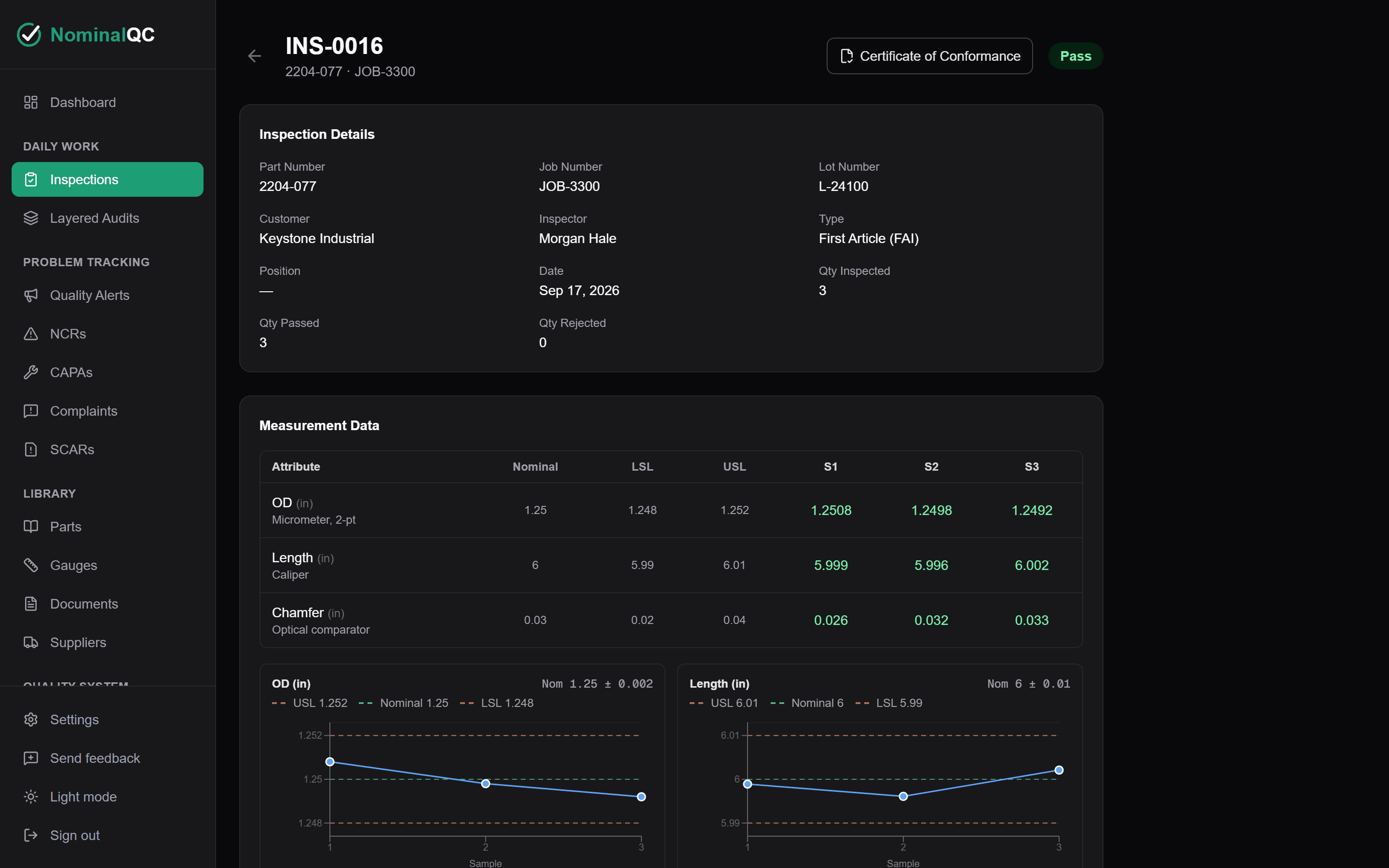
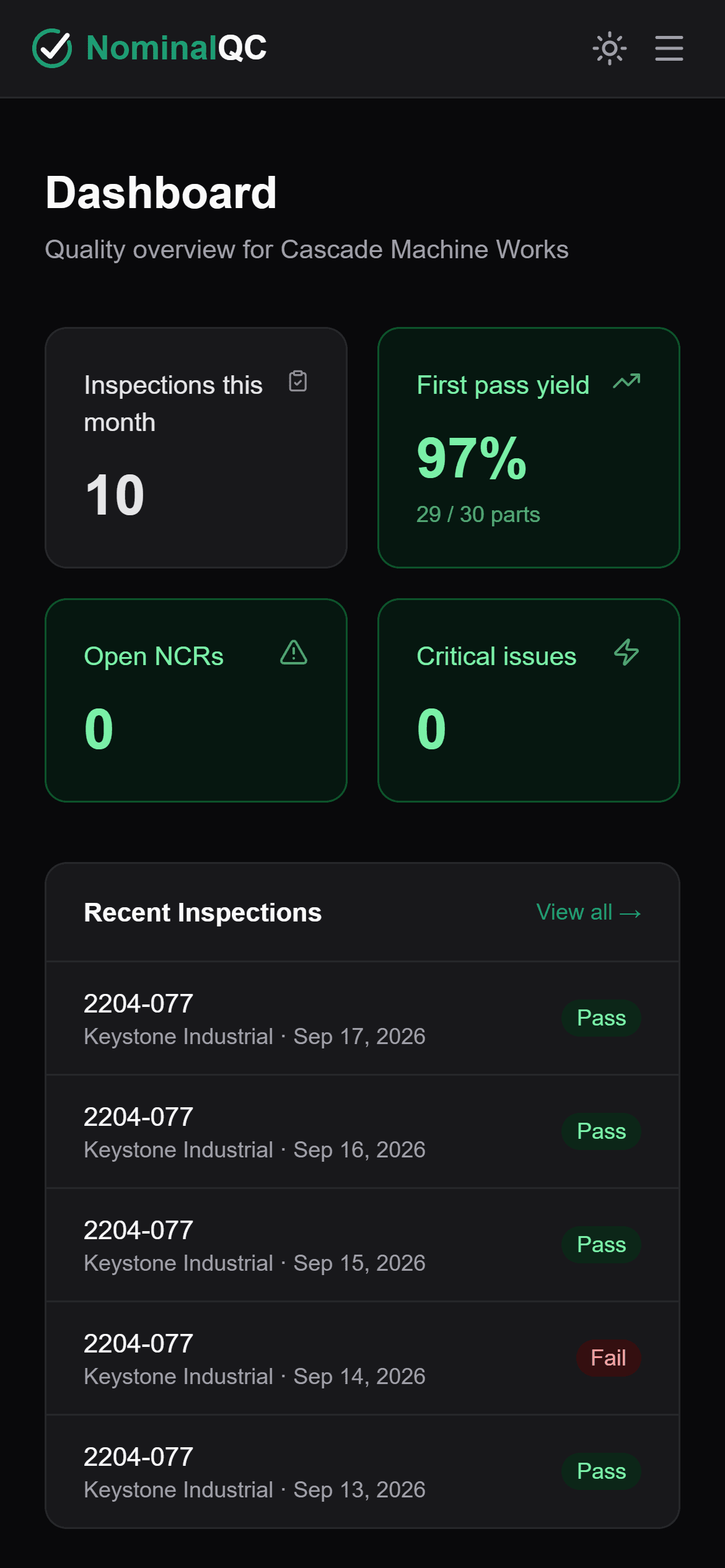
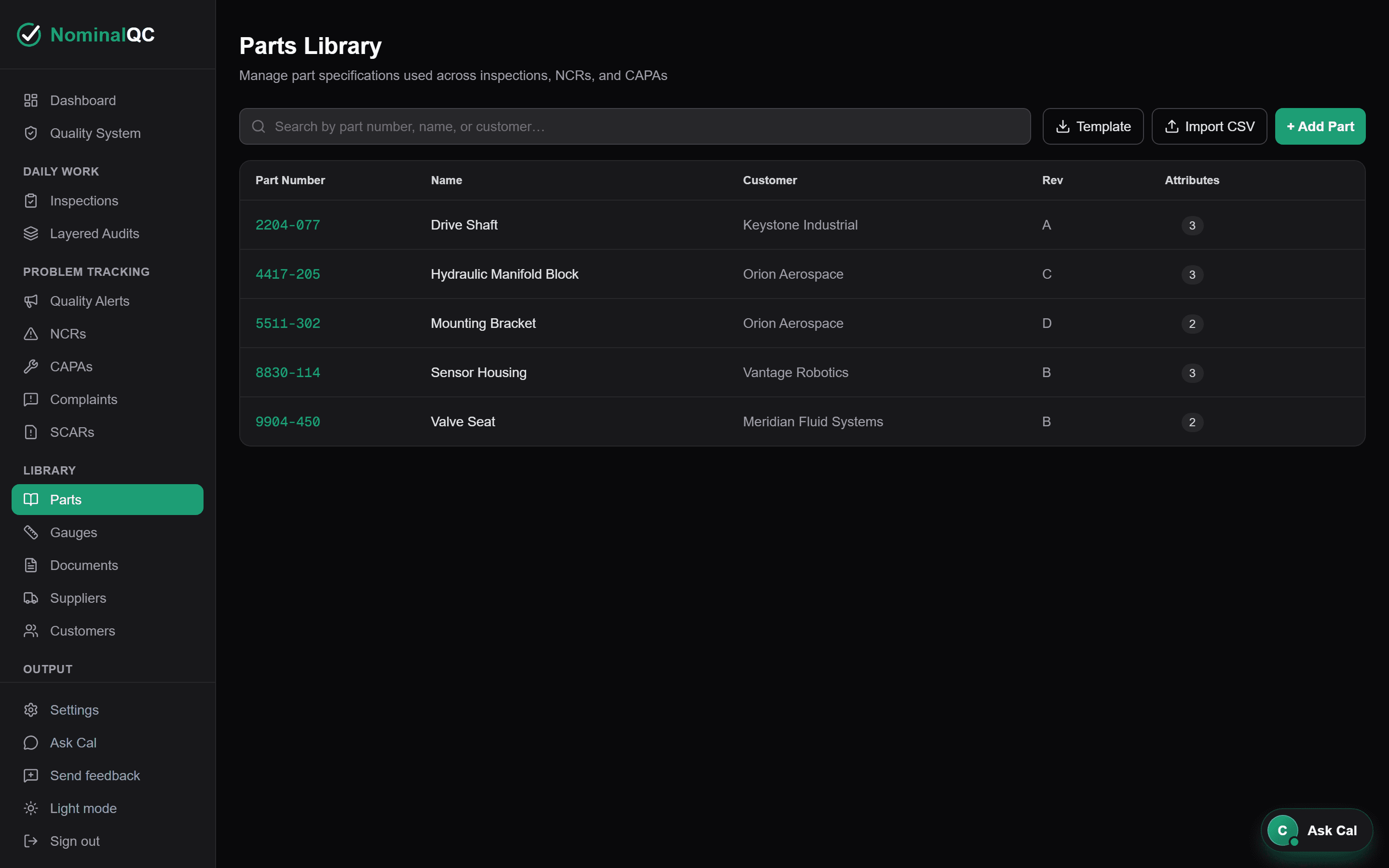
Real screens from the actual product — not mockups.
Build your parts library
Define each part’s specs once — nominal, tolerances, units, decimal places. Add parts by hand or import your whole library from CSV in minutes.
Log inspections — pass/fail is automatic
Inspectors enter measurements and every sample is checked against spec instantly. Out-of-spec values flag in red, and the result rolls up to pass, fail, or conditional on its own.
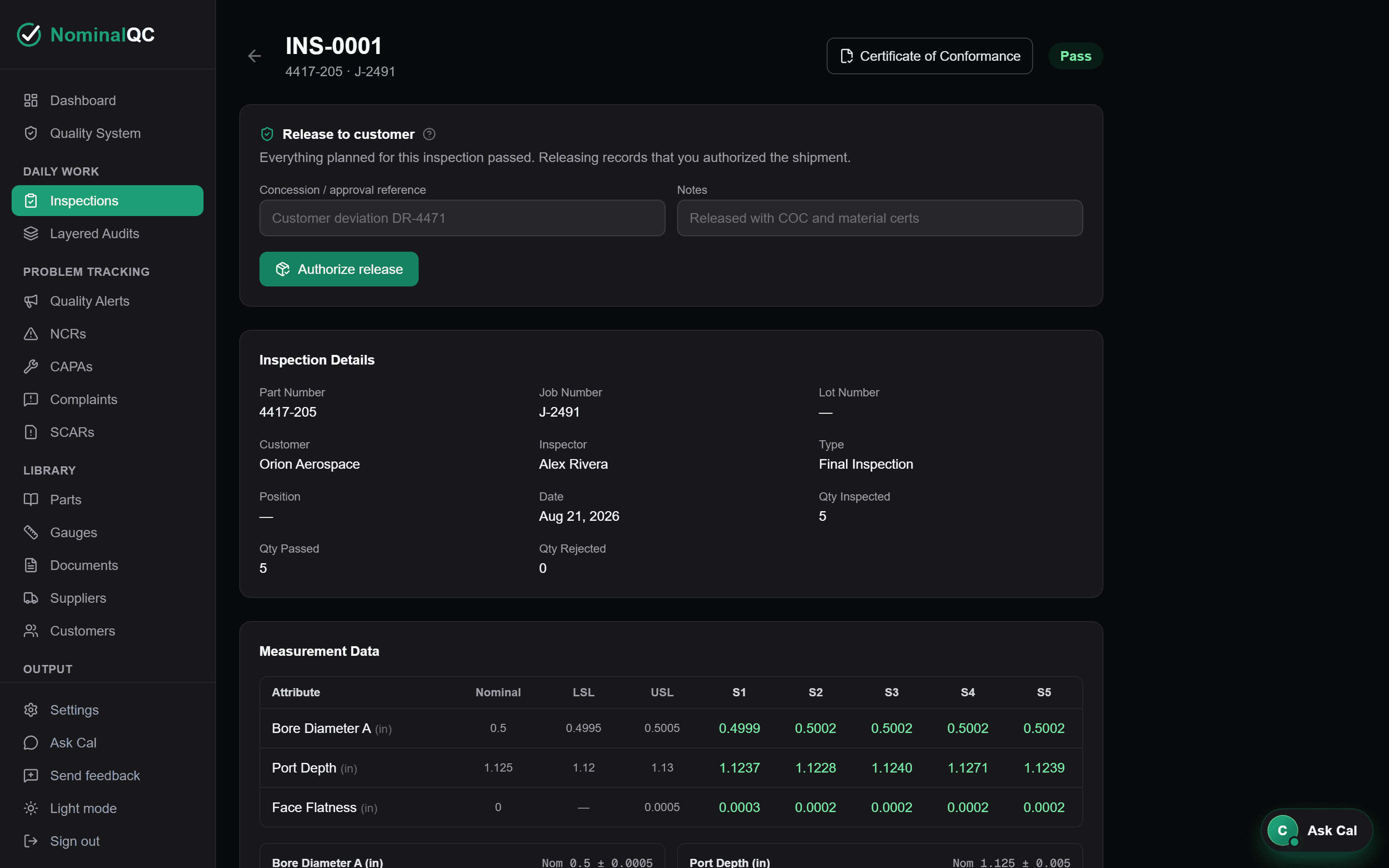
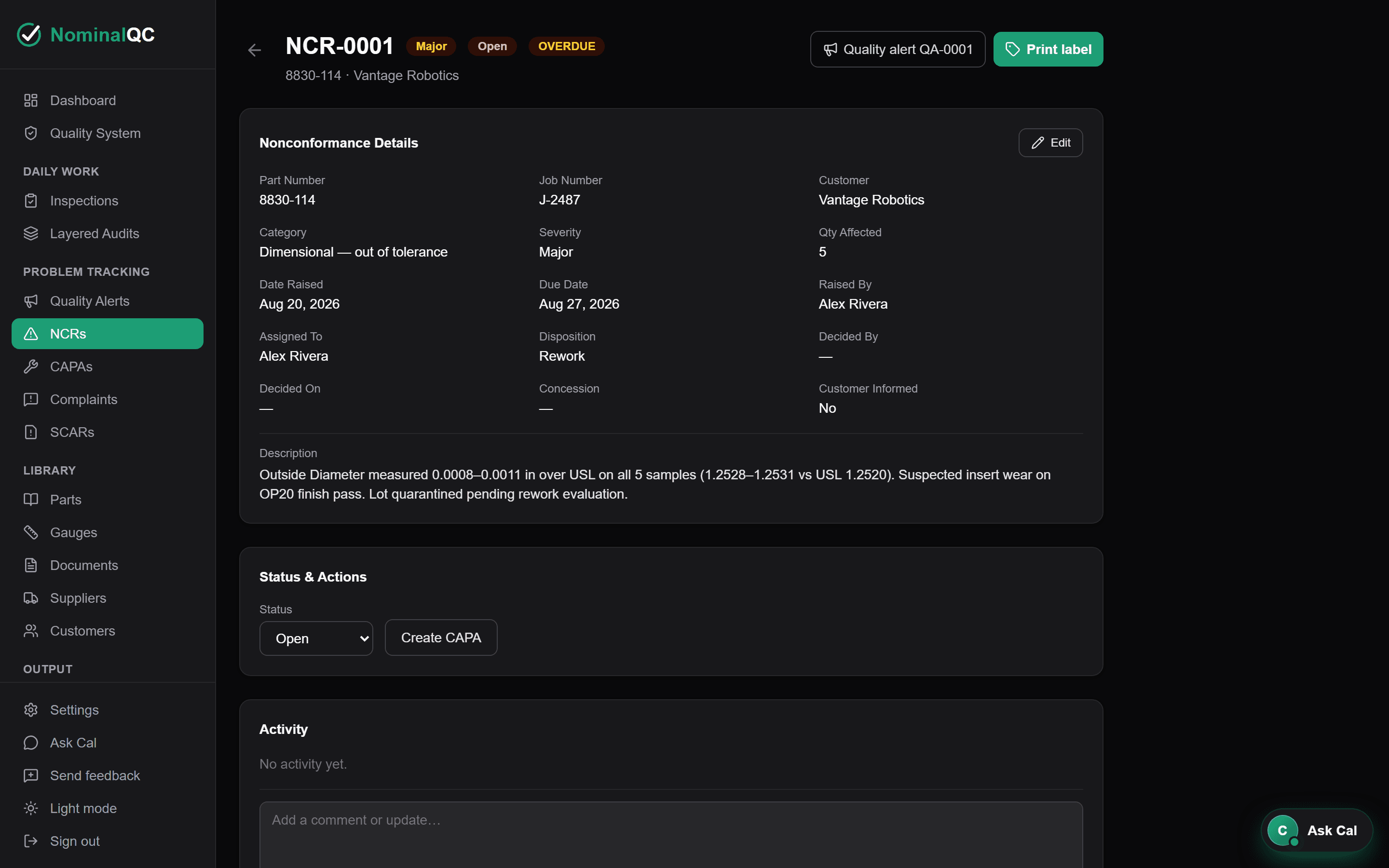
Contain problems with NCRs
Raise a nonconformance straight from the inspection — assign an owner, set severity, disposition, and a due date. Every action is tracked for your audit trail.
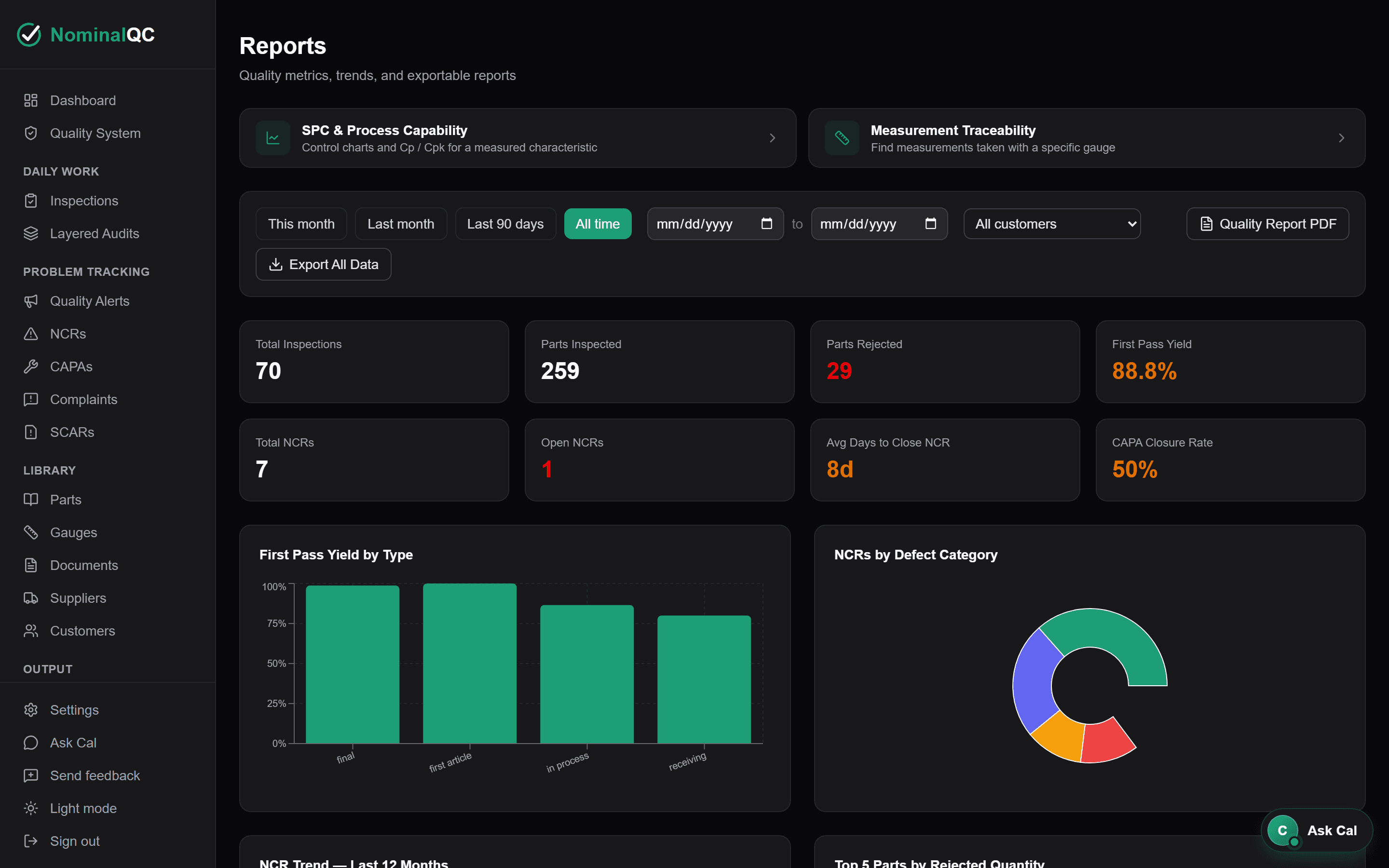
Audit-ready reports in one click
First-pass yield, NCR trends, and rejection hot spots — live, filterable, and exportable as customer-ready PDF reports whenever an auditor asks.
See the full setup walkthrough — signup to first inspection →
05 · The toolkit
Everything a small shop needs.
Nothing it doesn't.
Inspection Log
First article, in-process, final, and receiving inspections.
Learn more →
Inspection Plans
Frequency, samples, method, gauges — with Warn or Block enforcement when a part needs it.
Learn more →
NCR Tracker
Raise an NCR in one click from a failed inspection — assign, track, and close with a full audit trail.
Learn more →
CAPA Management
Guided 8D and 5-Why worksheets, closure gates, and a customer-submittable 8D report.
Learn more →
Gauges & Calibration
Out-of-cal gauges can’t be picked at inspection time. Due dates, history, and traceability.
Learn more →
Quality Alerts
Critical issues gate the next inspection until each inspector acknowledges — nobody can miss the memo.
Learn more →
Layered Process Audits
CQI-8 / IATF 16949 LPAs — per-layer cadences, reaction plans, adherence evidence.
Learn more →
Document Control
Controlled procedures, work instructions and prints — approved revisions, read-and-understood by name, inspections held until the current rev is confirmed.
Learn more →
Quality Reports
Customer-ready PDF reports in one click.
Learn more →
SPC & Capability
X̄-R and I-MR control charts with Cp/Cpk — computed from inspections you already log.
Learn more →
Team Access
Role-based permissions, and an Assigned-to-you list at the top of everyone’s dashboard.
Learn more →
Your Data
Export everything anytime. No lock-in. No vendor dependency.
Learn more →
Quality System
The ISO 9001:2026 registers — context, risks, processes, resources, operation, improvement — grouped by clause on one page.
Learn more →
Cal, the Guide
Ctrl+K anywhere: jump to any page or form, find any record, look up how something works — and see what’s left on the record you’re viewing.
Learn more →
Two-Factor & Security
Authenticator-app two-factor, required by role with a grace period, and an owner-run recovery path.
Learn more →
Training & Competence
Skills register, per-person qualifications with expiry and evidence, and a competence matrix.
Learn more →
Audits
Internal, supplier, customer-specific and follow-up audits with findings by clause, owners, linked CAPAs and verification.
Learn more →
Management Review
Review-period data from your own records, typed decisions, an attendance roster and printed minutes.
Learn more →
Suppliers & SCARs
Approved supplier list with its basis, PPM and on-time evaluations, and SCARs sent, chased and verified.
Learn more →
Change Control
Impact review, a sequential approval chain with emailed approvers, temporary deviations with an end date.
Learn more →
Customer Complaints
Containment, a response-due clock, the NCR and CAPA it became, and what it cost.
Learn more →
Quality Objectives
Measurable targets with an owner and a plan, results charted against the target.
Learn more →
Records Retention
A rule per record type — years, trigger, disposition, basis — with a live count of what you hold.
Learn more →
Labels & Hold Tags
Letter and 4×6 thermal hold tags printed from the NCR, with a QR code that opens the record.
Learn more →
Certificate of Conformance
A CoC for every passed inspection, built from the readings — with test methods per characteristic.
Learn more →
06 · Pricing
Simple pricing. No surprises.
Free for one user, no time limit. Try any paid plan free for 14 days — flat monthly prices, never per seat.
Free
1 user
$0/mo
- Every quality module, no time limit
- Unlimited inspections & NCRs
- Cal, the in-app guide
- PDF reports & CSV export
- Email support
- Doesn’t fit your shop? We’ll work with you on it
No credit card. No time limit.
Team
Up to 5 users
$59/mo
- Everything in Free
- Up to 5 team members
- Cal, the in-app guide
- Activity log
- Priority email support
No credit card. Subscribe any time, or stay on Free after 14 days.
Pro
Unlimited users
$99/mo
- Everything in Team
- Cal, the in-app guide
- Unlimited users
- Priority support
No credit card. Subscribe any time, or stay on Free after 14 days.
Enterprise
Plants & multi-site
from$249/mo
- Everything in Pro
- Multi-site: every plant in one account
- Unlimited users & sites
- Per-site dashboards & reports
- Written quote, PO & annual invoicing
- Onboarding & data import
60-day free pilot · PO & annual invoice · or a 14-day trial
Buying through purchasing? We send a written quote and take purchase orders, with a 60-day free pilot first. Request a quote.
07 · Where to find us
Listed where quality software gets compared.
NominalQC is listed on Capterra, GetApp and Software Advice in three categories — Quality Management, Audit and Document Control. No reviews yet: if you've used it, a few honest sentences would help the next small shop find it.
08 · FAQ
Common questions.
Straight answers, no sales call required.
Can I import my existing parts and data?
Yes. The Parts Library has CSV import with a ready-made template, so you can load your whole part list — specs, tolerances, customers — in one shot. And everything you enter can be exported again anytime.
Will this satisfy an AS9100 or ISO 9001 auditor?
NominalQC keeps the records auditors ask to see: inspection logs with inspector traceability, NCRs with dispositions, CAPAs with root cause and effectiveness checks, gauge calibration records, training and competence, audits, management reviews, and the ISO 9001:2026 system registers from scope and risks to continual improvement. You still run your quality system, and the auditor decides conformance — we make the evidence quick to produce.
Does it cover ISO 9001:2026?
Yes — the Quality System page holds a register for each part of the 2026 edition that calls for a record, grouped by clause, including the changes: climate change as an issue and an interested-party requirement, quality culture and ethics, and the revised management review inputs.
Can records be edited or deleted after the fact?
Not quietly. Recorded inspection measurements and submitted audit answers are write-once at the database level — edits are rejected outright, not just discouraged. A closed NCR refuses changes to its details until it is formally reopened, and once work starts on a CAPA it becomes a permanent quality record that cannot be deleted. Where deletion is allowed, it leaves a named, timestamped entry in the activity log.
How long does setup take?
Most shops log their first inspection the same day. Add your parts (or import them from CSV), invite your team, and start inspecting. No IT project, no implementation contract, no training course.
Does it work on phones and tablets on the shop floor?
Yes. NominalQC runs in the browser and works on phones, tablets, and shop computers. Nothing to install, nothing to maintain.
Do all of my operators need their own logins?
No. Inspectors and managers get accounts with roles (owner, admin, inspector, viewer). For operators without logins, quality alerts come with printable alert sheets and signature rosters so the floor can still acknowledge on paper.
Where is my data stored, and is it secure?
Your records are encrypted at rest (AES-256) and in transit (TLS 1.3), with daily snapshots retained for 7 days — and you can download your own complete CSV export in one click, anytime. The full details are on our Trust & Security page. Read our Trust & Security page →
Is there two-factor authentication?
Yes. Anyone can turn on two-factor with an authenticator app in Settings → Security, and owners can require it by role with a grace period. Recovery codes come with it, and an owner can reset a teammate who loses both phone and codes.
Does NominalQC use AI?
No. Cal, the guide inside the app, searches pages, your records and the help, and shows what’s left on the record you’re viewing. Cal on this website answers from our own pages. Both are plain software — no AI model, so nothing you type is sent to one.
What happens to my data if I cancel?
It leaves with you. Download a complete archive — inspections, measurements, NCRs, CAPAs, and your parts library as CSVs in a single ZIP — in one click, anytime. And if we ever closed shop, you would get 90 days’ notice and a complete data package before anything shut down.
Can we pay by purchase order or invoice?
Yes. If your purchasing process runs on POs, we invoice — net-30 terms, your PO number on every invoice, payable by ACH, card, or check. Annual invoicing is the usual fit for procurement. Request a quote on the quote page and we send a written quote your purchasing team can raise a PO against, with a 60-day free pilot first; a W-9, vendor information packet and security overview are available on request. And since one user is free with no time limit, nothing stops while the paperwork is in process.
Can I try it without a credit card?
Yes. One user is free with no time limit, and Team, Pro and Enterprise each start with a 14-day free trial — no credit card for either. Plants buying Enterprise on a quote get a 60-day pilot instead. Subscribe during the trial from Settings → Billing to keep the plan; if you don’t, the account carries on free for one user with everything you entered. If it doesn’t fit your shop, walk away with your data.
Your quality records are safe — and they're yours.
Encrypted at rest and in transit. Daily backups. Recorded measurements are write-once at the database level. Export everything, anytime.
Final inspection
Ready to retire the paper logbook?
Be inspection-ready in under 10 minutes.
14 days freeNo credit cardNo sales call