Free Template · from the makers of NominalQC, QC software for small manufacturers
Free process turtle diagram template for Word
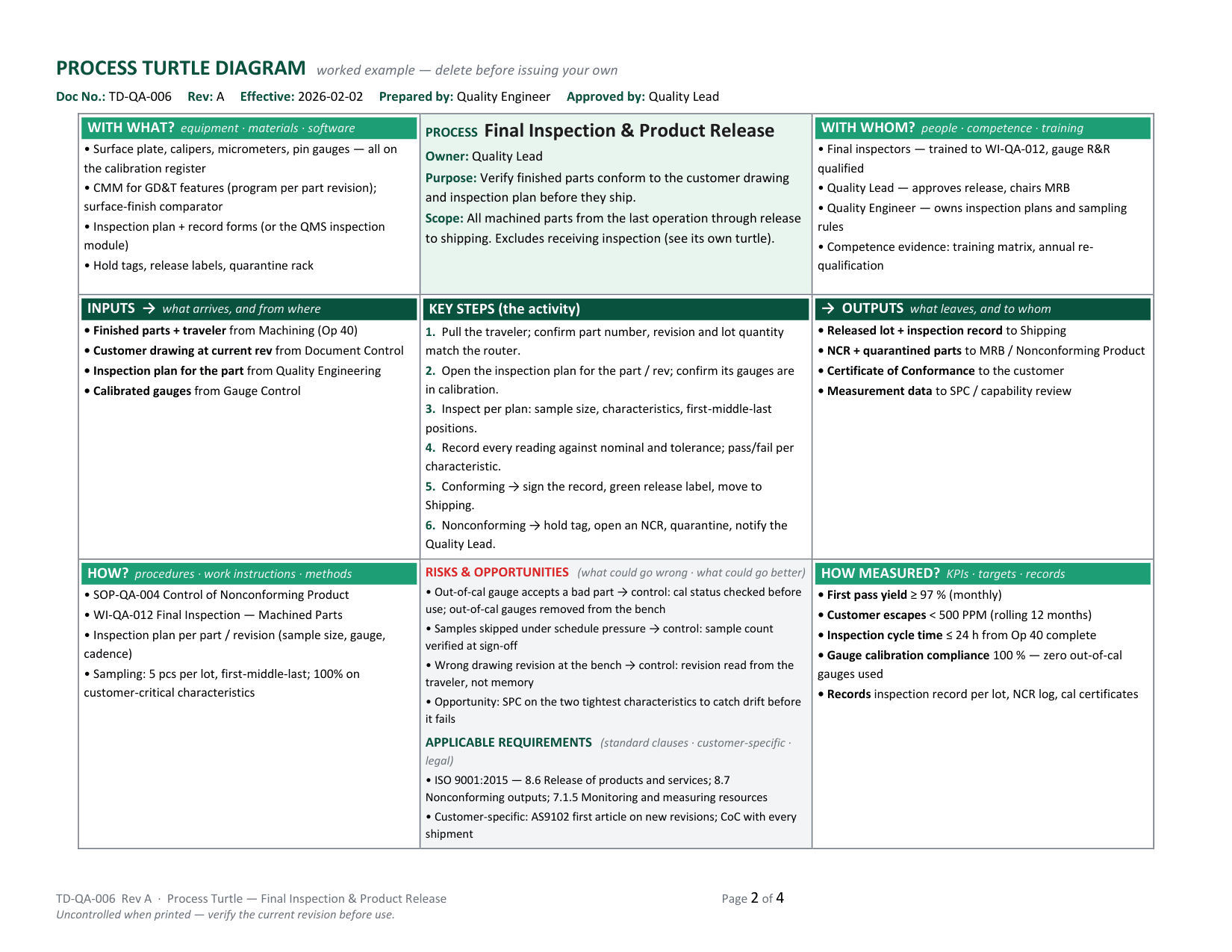
One process on one landscape page: what comes in and from where, what goes out and to whom, the key steps in the shell, and the four legs an auditor always asks about — with what, with whom, how, and how measured — plus risks paired with their controls and the clauses that apply. A worked example (final inspection and release at a machine shop), a blank with guidance in every cell, and a page of process-audit prompts per leg.
Related: ISO 9001:2026 gap analysis · Internal audit checklist · SOP template · PFMEA worksheet
Free Word template — no email, no signup.
This log, without the spreadsheet
The turtle describes the process; NominalQC audits it — layered process audits on a cadence with rotating assignments, email reminders, owned findings, and a live compliance dashboard.
Try the live demoOpens on the real app with seeded data · no signup, no email · read-only · free for one user when you’re ready.
Prefer it in your inbox, with two short notes on using it?
What’s in the download
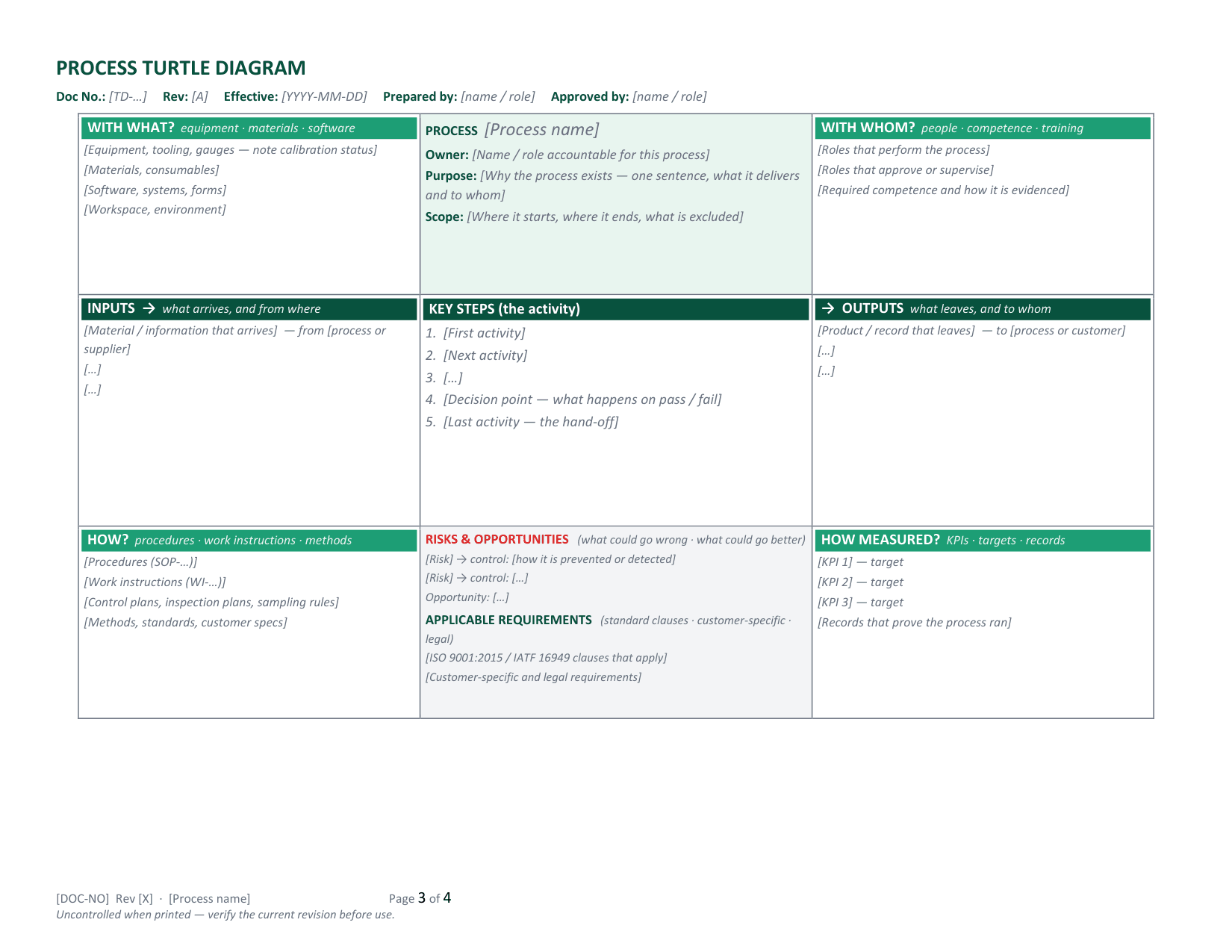
- One-page turtle: process identity (name, owner, purpose, scope), key steps in the shell, INPUTS and OUTPUTS with source and destination, and the four legs — with what, with whom, how, how measured
- Risks & opportunities block (each risk paired with its control) and an applicable-requirements block for ISO 9001 / IATF 16949 clauses and customer-specific requirements
- A worked example — Final Inspection & Product Release at a small machine shop — filled in with real gauges, procedures, roles, and KPI targets
- A blank turtle with guidance text in every cell
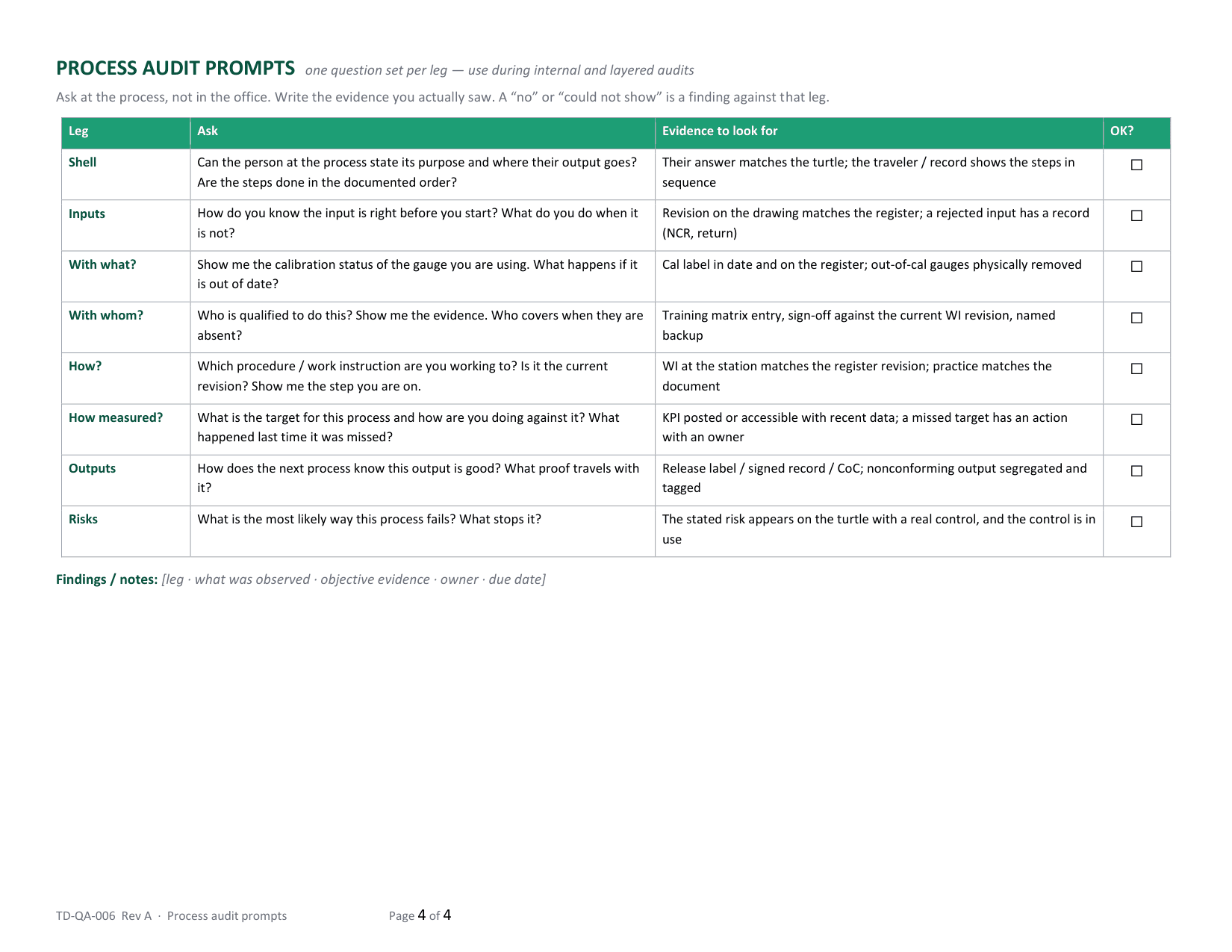
- Process audit prompts: one question set per leg with the evidence to look for and an OK box — for internal and layered audits
- Document-control footer with page X of Y and an “uncontrolled when printed” line
- Plain .docx — no macros, no locked fields — opens in Word 2010+, Google Docs, and LibreOffice
You get the Word document (.docx). Page 1 is the how-to; copy the blank page once per process and delete the how-to and example before you issue.
Where this spreadsheet breaks
A turtle describes the process well enough to audit it. It doesn’t run the audit — and that gap is where audit programs quietly die:
1.The turtle is drawn; the audit never happens
The diagrams are done for the certification audit and filed. Nobody walks the process with the prompts on a schedule, and by the surveillance audit the turtle describes a process that has moved.
NominalQC runs layered process audits — short, frequent, rotating checks by supervisors and managers on a cadence — so auditing becomes a weekly rhythm instead of an annual siege.
2.Findings are written down and forgotten
A “could not show” against the with-whom leg goes into an audit report. No owner, no due date, no follow-up — the same finding is written again next year.
In NominalQC audit findings are records with owners: creation emails the work-center owner, aging findings escalate automatically, and closure requires verified corrective action.
3.The “with what” leg can’t prove itself
The turtle lists calibrated gauges. Whether the caliper at the bench was actually in calibration on the day of the lot is a separate question the diagram can’t answer.
In NominalQC a gauge with no calibration on record can’t be picked in the inspection form, and cal dates derive only from logged calibration events — the evidence is on the record.
Who built this
I spent 16 years in manufacturing quality — machining, fabrication, assembly — and in every shop I ended up building the same Excel tools with macros because the software budget went elsewhere. These workbooks are the ones I kept rebuilding. Eventually I stopped rebuilding spreadsheets and built NominalQC instead — but the spreadsheet is still the right starting point for a lot of shops, so here they are, cleaned up and free.
Questions
Is it really free?
Yes. Click Download and the full workbook is yours — no email, no signup, no card. If you would rather have it sent to your inbox, there is an optional email link under the button; that path adds two short follow-up emails about running the process, then silence — unsubscribe anytime.
Does it work in Google Docs or LibreOffice?
Yes — it is a plain .docx built from ordinary tables and styles: no macros, no locked fields, no content controls. It opens in Word 2010 or later, Google Docs, LibreOffice, and Pages. Page numbers are standard fields that refresh when you open or print.
Which processes need a turtle diagram?
Every process in your quality management system’s process map — the ones a certification auditor will audit by the process approach: sales / contract review, purchasing, receiving, production, inspection and release, nonconforming product, calibration, training, internal audit, management review. Support processes get one too. If you can name a process owner, it gets a turtle. One page each; if a page overflows, it is usually two processes.
Is this the IATF 16949 turtle or the ISO 9001 one?
The same diagram serves both. IATF 16949 auditors expect turtles for the process approach and use the legs to structure the audit; ISO 9001:2015 clause 4.4 asks for inputs, outputs, sequence, criteria, resources, responsibilities, risks, and performance indicators for each process — which is exactly what the cells hold. The applicable-requirements block is where you cite the clauses and customer-specific requirements for your certification.
More free templates
Ready to skip the spreadsheet stage?
Inspections, NCRs, CAPAs, LPAs, and gauge calibration — free for one user, team plans from $59/month flat.
Create your free account