Free Template · from the makers of NominalQC, QC software for small manufacturers
Free PFMEA template for Excel
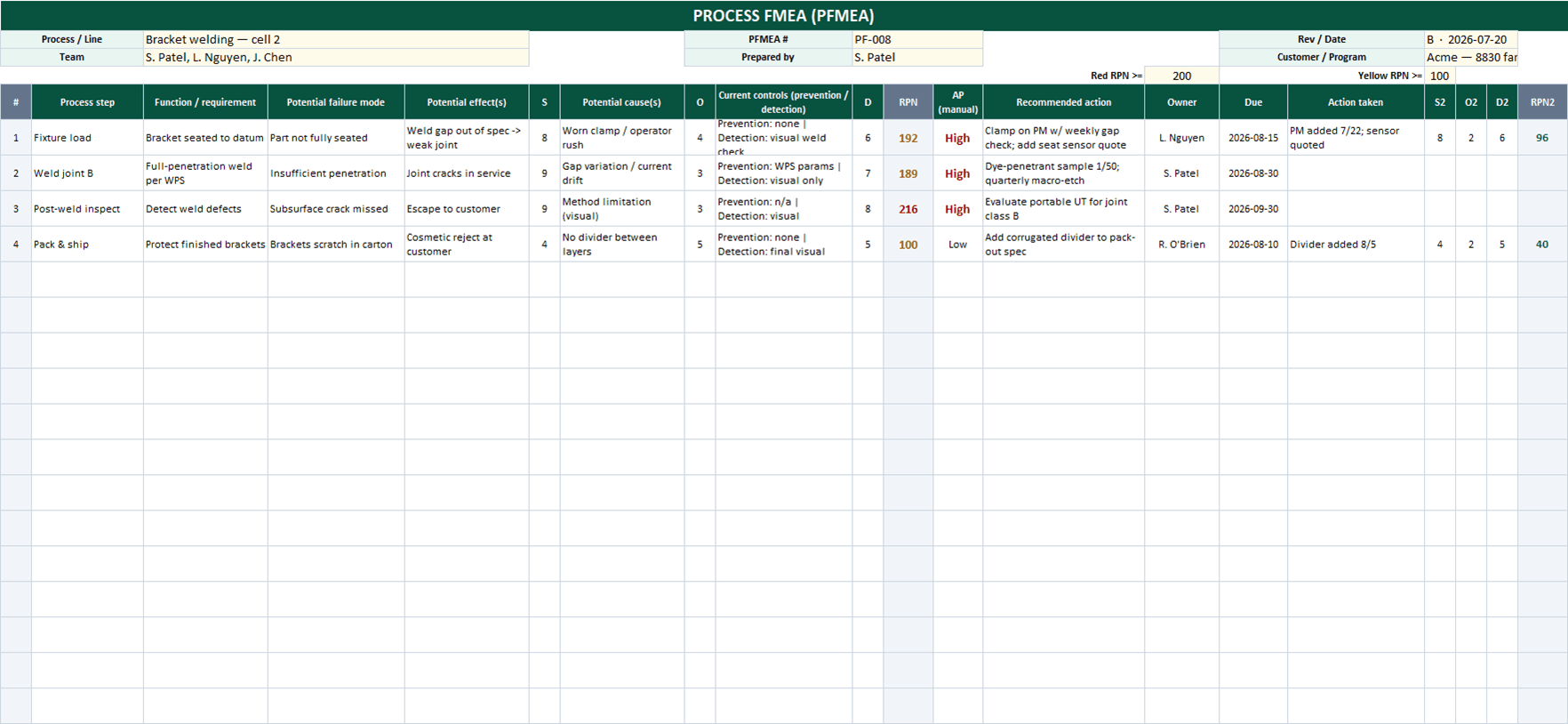
The full PFMEA worksheet without the seminar: one row per failure mode, S×O×D computes and colors automatically against thresholds you control, actions carry owners and due dates, and re-rating after actions shows the improvement as a second RPN. A generic S/O/D guide is included for shops without a customer-mandated table.
Related: Process turtle diagram · Internal audit checklist · SPC control charts
Free Excel template — no email, no signup.
This log, without the spreadsheet
NominalQC turns your control plan into enforced inspection plans — and its NCR history gives FMEA reviews real failure data instead of memory.
Try the live demoOpens on the real app with seeded data · no signup, no email · read-only · free for one user when you’re ready.
Prefer it in your inbox, with two short notes on using it?
What’s in the download
- The full PFMEA column set: process step, function, failure mode, effects, S, causes, O, current prevention/detection controls, D, RPN, actions, and post-action re-rating
- Automatic RPN (S×O×D) with color thresholds you set (defaults: red ≥ 200, yellow ≥ 100)
- Post-action S/O/D columns computing a second RPN so improvement is visible on the sheet
- Ratings validated to 1–10, with a plain-English generic S/O/D rating guide sheet
- A worked welding-process example showing prevention vs detection controls done properly
- An honest AP column: manual High/Medium/Low dropdown — the AIAG-VDA Action Priority table is copyrighted, so we don’t fake an approximation of it
- 100% macro-free — works in Excel 2010+ on Windows and Mac, no security prompts
You get the workbook (.xlsx) — its Instructions sheet is the quick-start. Sample rows are included — overwrite them with your process.
Where this spreadsheet breaks
The FMEA names your risks and your controls. The question it can’t answer is whether those controls actually run:
1.The detection controls are aspirational
The D rating assumes "100% gauge check" happens every time. On a busy Friday, nothing connects the FMEA’s assumption to the floor’s reality.
NominalQC turns controls into enforced inspection plans — characteristics, sample rules, and enforcement modes that decide whether a skipped check is a warning or a hard stop.
2.The FMEA and the failures never reconcile
Real failures land in an NCR log the FMEA team doesn’t reread. Occurrence ratings drift from reality, and the document ages into fiction.
NominalQC’s NCR and complaint records give you the actual failure history by part and process — so FMEA reviews update O ratings from evidence, not memory.
3.Actions live and die on the worksheet
The recommended-action column has no reminder attached. High-RPN actions quietly miss their dates with nothing flagging it.
In NominalQC corrective actions are owned records with due dates, notifications, and closure gates — the FMEA’s action list becomes work that tracks itself.
Who built this
I spent 16 years in manufacturing quality — machining, fabrication, assembly — and in every shop I ended up building the same Excel tools with macros because the software budget went elsewhere. These workbooks are the ones I kept rebuilding. Eventually I stopped rebuilding spreadsheets and built NominalQC instead — but the spreadsheet is still the right starting point for a lot of shops, so here they are, cleaned up and free.
Questions
Is it really free?
Yes. Click Download and the full workbook is yours — no email, no signup, no card. If you would rather have it sent to your inbox, there is an optional email link under the button; that path adds two short follow-up emails about running the process, then silence — unsubscribe anytime.
Does it work on Mac or older Excel?
Yes — this workbook is 100% macro-free, so there’s no "Enable Content" prompt and it works in Excel 2010 or later on Windows and Mac.
Why doesn’t the template compute AIAG-VDA Action Priority automatically?
Because the official AP table is copyrighted AIAG-VDA content, and the "approximations" floating around get edge cases wrong — which matters exactly when a customer audits your FMEA. If your customer requires AP, assign it manually from the official FMEA Handbook (the AP column is a dropdown, ready). If they don’t, RPN with your own thresholds — which this template automates fully — remains a defensible, widely used approach.
Can I change the lists and dropdowns?
Yes — every dropdown pulls from the CONFIG sheet (your people, work centers, categories), and it’s all editable with no code involved. That’s the point: it should match your process, not ours.
More free templates
Ready to skip the spreadsheet stage?
Inspections, NCRs, CAPAs, LPAs, and gauge calibration — free for one user, team plans from $59/month flat.
Create your free account