Pro Template · from the makers of NominalQC, QC software for small manufacturers
NCR & CAPA Pro Template (Excel)
Nonconforming-material control to clause 8.7 and corrective action to clause 10.2 in one workbook. The two logs link: the NCR row shows the status of its CAPA, the 8D reads the part from the NCR, and the quality alert, 5-why, 3-legged 5-why and Ishikawa sheets fill their headers from the record you pick.
Who it is for: The quality professional at a 10 to 50 person shop who raises NCRs, closes CAPAs and has to show an auditor the loop from the escape to the effectiveness check, usually with 8D expected by at least one customer.
Nonconformance and corrective action in one workbook, with alerts and root-cause tools
$19one-time
- Light and dark editions in the download
- Macro-free: Excel 2010+, Mac, LibreOffice
- Sample records from a machine shop, type over them
- Your receipt re-downloads the latest build
One-time payment, no subscription. Card handled by Stripe.
Or all three templates for $49, saves $8: the bundle.
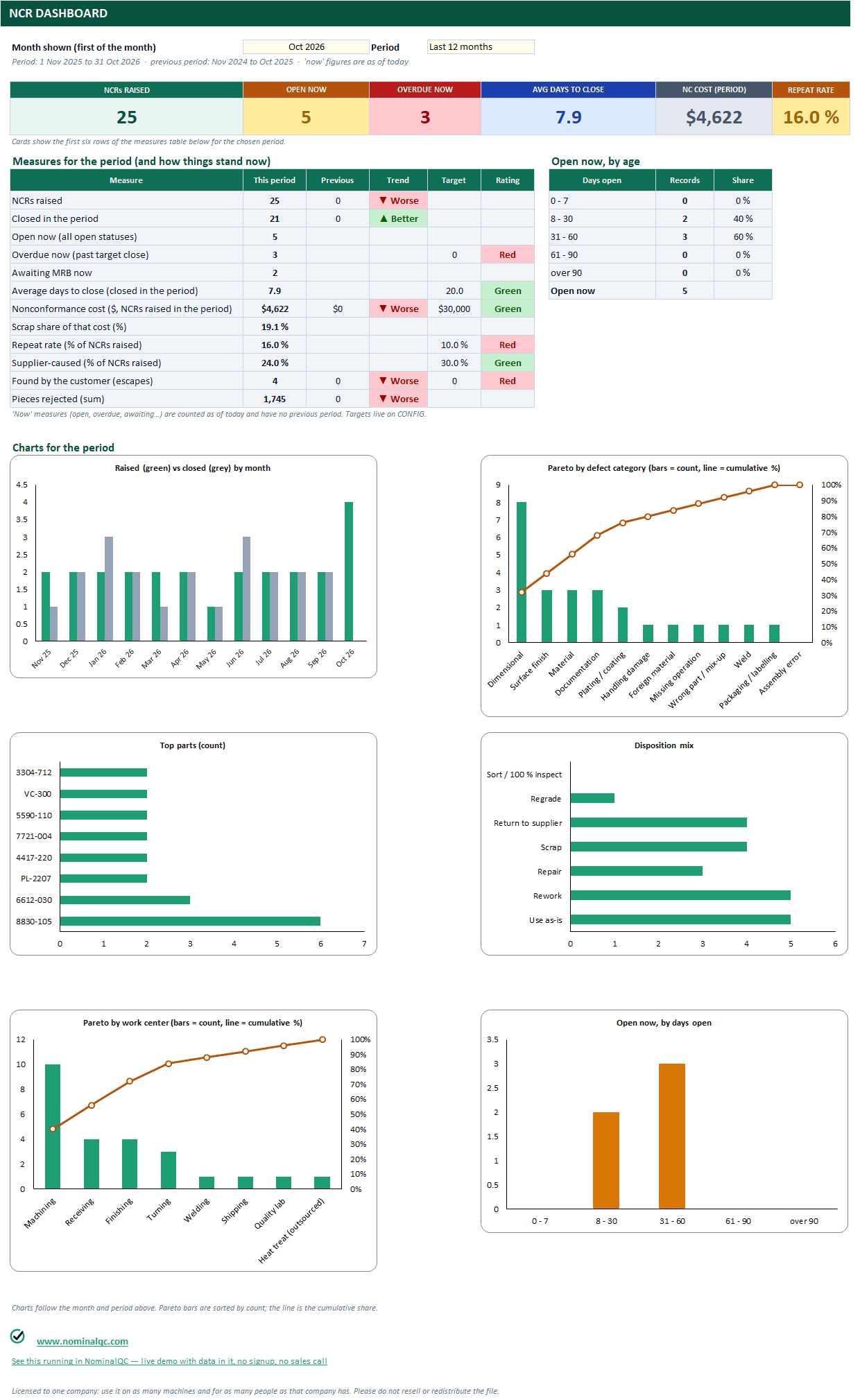
NCR DASHBOARD: month and period selector, six cards, twelve measures with the previous period, trend and rating, open NCRs by age, raised vs closed, Pareto by defect and by work center, top parts, disposition mix.
Every sheet, up close
16 captures from the workbook you download, taken in Excel with the sample records in. Click any one for the full-size view, then “Actual size” to read the cells; the arrow keys move between sheets. The light edition is shown; the dark edition is the same workbook.
What’s in the download
NCR LOG
1,000 rows, 44 columns in process order: where it was found and by whom, containment quantities (affected, sorted, rejected), MRB disposition, customer notified and concession number, SCAR reference, the cost split (scrap, rework hours at your rate, sort, other), the CAPA number and the status of that CAPA read from the CAPA LOG. Target close comes from the severity; days open, OVERDUE and REPEAT (same part and defect inside your window) are formulas.
NCR REPORT
Pick an NCR number and the report fills itself: identification, description, containment, MRB disposition, cost, close-out, signature lines. Prints on one page. The sheet is protected without a password, so nothing gets typed over a formula; to change a value you change the log row.
ALERT LOG + QUALITY ALERT
A 200-row register of quality alerts linked to an NCR or a CAPA, with issue and review dates, status, acknowledgements required and received, and OVERDUE when an active alert passes its review date. Pick an alert and the floor alert fills itself (part and defect from the linked NCR): page one carries what to look for, what to do and a ten-line acknowledgement table; page two is two full-width photo boxes, BAD and GOOD, big enough to see the detail.
CAPA LOG
1,000 rows, 45 columns in 8D order: source and linked record, a part block (part, description, revision, customer, lot, quantity) that may stay blank when the record is an NCR, type and priority, the problem statement, team, containment, root cause with its category and method, the action chosen and implemented, what was changed to prevent recurrence, read-across (similar parts, similar processes or sites, the action taken, owner, date), effectiveness check due, done and result, recurrence, cost. Target close comes from the priority; the effectiveness due date from the implementation date; ON TIME or LATE is computed at closure.
8D REPORT
Pick a CAPA number and the 8D report (D0 to D8) fills itself, with a part block that reads the linked NCR when the CAPA row leaves it blank, read-across under D7, and sign-off lines for the team, quality and management. Prints on one page. Protected like the NCR report.
5-WHY · 3-LEGGED 5-WHY · ISHIKAWA
Pick the CAPA and each sheet fills its header (problem statement, part, team, linked record) from the CAPA LOG; the analysis is yours to type. One chain with an evidence column and a verified flag; three legs (occurrence, detection, systemic) each with a root cause, an action and an owner; a six-bone fishbone with a tested shortlist and the confirmed causes that go back to D4. Each prints on one page, with one worked example from the sample data.
NCR DASHBOARD · CAPA DASHBOARD
A month and period selector on each (this month, last 3, last 12, calendar or fiscal year to date). NCR: twelve measures with the previous period, the trend and a rating against your targets; open NCRs by age; raised vs closed by month; Pareto by defect category and by work center with the cumulative line; top parts; disposition mix. CAPA: thirteen measures including closed on time, effective first time, checks due, not effective, recurrences and cost; opened vs closed; Pareto by source, root-cause category and department; type mix; open by age.
NCR REVIEW · CAPA REVIEW
Two one-pagers for the quality meeting: the measures, the oldest open, overdue, awaiting MRB and the repeat parts (NCR); overdue CAPAs, effectiveness checks due in the next 30 days, the ones found not effective and the oldest open (CAPA). Signatures. Nothing to type.
CONFIG
One sheet for both: your rework labour rate, fiscal year, the repeat window, target days per severity and per priority, the effectiveness-check delay, eleven targets, and the lists behind every dropdown; people, customers and suppliers are shared by the two logs.
Two workbooks in the zip, light and dark, plus an Instructions sheet in each. No macros, no array formulas, no add-ins.
Why it earns its price
The free version records. This one runs the process. Three things the workbook does that a log with a logo cannot:
1.The two logs link: type the CAPA number on the NCR row and the CAPA status shows there; type the NCR number on the CAPA row and the 8D, the alert and the root-cause sheets read the part, lot, customer and quantity from it.
2.Read-across is part of the 8D (D7): which similar parts, processes, lines or sites were checked and what was done there, so one escape fixes the family and not just the part.
3.Every sheet that fills itself is protected without a password: a reader cannot type over a formula, and the yellow cells still take a signature or a note. Green tabs are where you type; slate tabs fill themselves.
4.Repeat detector, the cost split, effectiveness as a date that falls due, and not-effective CAPAs and recurrences listed where an auditor looks.
Start with the free version: NCR Log & Dashboard · CAPA Log & Dashboard · 8D Problem-Solving Report · 5-Why + Fishbone Pack · Quality Alert System · Customer Complaint Log. Or see the same records running in the app (read-only demo, no signup).
Free template vs Pro Template
The whole line side by side. Rows that name another template apply to that template.
| What | Free template | Pro Template |
|---|---|---|
| Rows in the log | 200 | 1,000 (60 months in the KPI log), plus a documented way to add more |
| Dashboard | All-time totals | Any month and period, with the previous period, the trend and a rating against your targets |
| Form | A blank one-page form to type into | Fills itself from the log row you pick, with sign-off lines, prints on one page, and is protected so nothing is typed over a formula |
| NCR to CAPA | Two workbooks that do not know about each other | One workbook: the NCR row shows its CAPA status, the 8D reads the part from the NCR |
| Root-cause tools | A separate 5-why / fishbone workbook with headers typed by hand | 5-why, 3-legged 5-why and Ishikawa inside the CAPA workbook, headers filled from the CAPA you pick |
| Quality alert | Its own workbook: log, printable alert, acknowledgement tracking | A register linked to the NCR; the floor copy fills from the NCR row, with a signature table and a BAD / GOOD photo page |
| Read-across | Not on the 8D | Similar parts, processes, lines and sites checked, the action, owner and date, on the log and the 8D |
| Pareto | Plain bar charts | Sorted bars with the cumulative share line, per period |
| Cost | One estimated-cost column (NCR) | Scrap, rework at your rate, sort and other, totalled per NCR and per period |
| Repeat detection | None | Same part and defect inside your window flagged and counted (NCR) |
| Effectiveness | A text column (CAPA) | A due date from the implementation date, a result, recurrence, and a list of what did not work |
| Management review | Not covered | The fourteen 2026 inputs with figures from the KPI log, objectives, actions carried forward |
| Review page | None | One printable sheet per template |
| Dark edition | No | Yes, in every download |
| Control charts | One characteristic per sheet, four rules, one frozen baseline (SPC pack) | One log for 24 characteristics, a selector chart, all eight Nelson rules, limits per phase |
| Capability | Cp, Cpk, Pp, Ppk, % out of spec, histogram (Cpk calculator) | Plus Cpm, PPM, a 95 % confidence interval, Anderson-Darling normality, a probability plot and a study page that prints |
Questions
Is this a subscription?
No. Each template is a one-time purchase and the files are yours. There is nothing to cancel and no account to create. Your receipt carries a link that re-downloads the latest build whenever you like.
Does it work on a Mac, or in LibreOffice?
Yes. The workbooks have no macros and no array formulas, so they open in Excel for Mac, Excel 2010 and later on Windows, and LibreOffice. Google Sheets opens them too, with the usual Sheets limits on conditional formatting.
How is this different from the free templates?
The free workbooks record things. These run the process: the dashboard answers for any month or period against your own targets, the form fills itself from the log, Pareto charts are sorted with the cumulative line, costs and repeats are counted, the effectiveness check falls due by itself, and each template prints a one-page review sheet. Every one also ships in a dark edition.
Can I edit the report sheets?
The sheets that fill themselves (the reports, the alert, the chart and study, the management review meeting minutes, the dashboards, the review pages) are protected without a password so a reader cannot type over a formula by accident. Yellow cells on them still take a signature or a note. To change a value, change the log row; to restyle a sheet, Review > Unprotect Sheet lifts the protection.
Does it come full of someone else's sample data?
No. The workbooks you download carry a handful of sample rows (three NCRs, two CAPAs and one alert; two characteristics with a dozen subgroups; three months of KPIs) so every sheet is seen working, and they clear in a minute. The zip also holds a worked example of each workbook with a year of records from one machine shop, in its own folder, for reference.
Can I add my own KPIs, categories, people?
Yes. Every dropdown reads a yellow list on CONFIG with spare rows. The KPI template has 24 KPI slots, sixteen pre-filled, and each one is yours to rename or retire.
What happens when I pass 1,000 rows?
Select the END OF LOG row, insert rows above it and copy the last row down. Every count, chart and dropdown already reaches that row, so inserted rows are included. The Instructions sheet shows the two steps.
Will it talk to the NominalQC app?
Not automatically. The templates are standalone Excel workbooks. When the log outgrows a spreadsheet, the same records run in the app with multi-user access, reminders and an audit trail; each workbook carries a link to the live demo.
What if it is not what I expected?
Reply to your receipt within 30 days and say so, and you get your money back. No form to fill in.
More Pro Templates
The three-template bundle
All three templates for $49(saves $8)
Past the spreadsheet stage?
The same records run as live screens in NominalQC, with multi-user access, reminders and an audit trail. Free for one user, flat monthly plans for the whole shop.